YoMoo
YoMoo updates
What changed in each version of the Japanese reading app with furigana, newest first. A version is listed once it is live on Google Play and the App Store.
How the dates work. The iPhone date is the release date in the App Store version history. The Android date is the first day Google Play's install reports show the build reaching readers. Android sometimes gets a change a day or two earlier, in a build with a different number. The browser version at my-senpai.com/analyzer/yomoo/ is updated separately.
Version 0.31.3: a new app icon
iPhone: 28 October 2026 · Android: in the current Google Play version
- YoMoo has a new icon: Mt. Fuji with the sun behind it and the hiragana よ.
Version 0.31.1: export your words, accurate JLPT levels, better furigana
iPhone: 25 October 2026 · Android: 24 and 25 October 2026 (0.31.0 to 0.31.2)
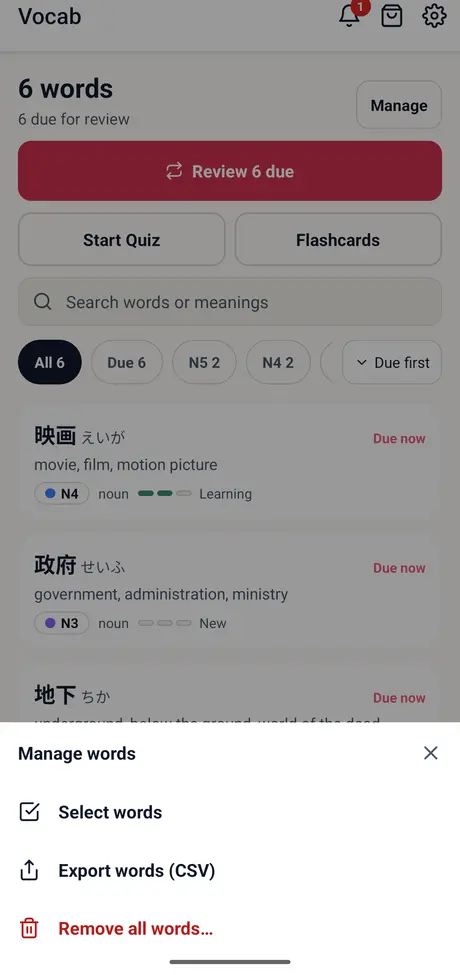
- Export your words: Vocab, Manage words, Export words saves every saved word as a CSV file that Anki and spreadsheets open.
- JLPT levels now come from word lists for the word itself, not its first kanji: 犬 is no longer N4, and 企業 is no longer N1.
- Hundreds of readings fixed, such as 間 read as あいだ where it should be, food words like 牛丼 and 麻婆豆腐, and well-known names such as 大谷翔平. Names the dictionary does not list are marked as a best guess.
- Fewer empty word cards: common words such as 人, 店 and 私 open their dictionary entry, and long-vowel spellings find their own word.
- Your own text, Aozora Bunko books and the sample no longer use up one of the 5 free articles. Settings adds privacy options where ad consent applies.
Version 0.28.0: Easy articles and study reminders
iPhone: 23 October 2026 · Android: 23 October 2026
- Easy articles: when an article has a simpler version, switch between Original and Easy on the Read screen, or set your default in Settings.
- Optional study reminders after your first saved word, for words due or a streak about to end; one a day at most.
- A new end-of-article card shows how many words you saved, then goes straight to Review or another article.
- A short hint shows new readers how to save a word.
Version 0.26.0: new Home and Vocab screens, translate beta
iPhone: 17 October 2026 · Android: 16 October 2026
- A new Home screen: jump back into your last article with Continue, or start Review in one tap.
- Translate pages of text you paste or import into English (beta): free users watch one ad per page; ad-free members get 5 pages a day.
- A redesigned Vocab tab: search, sort, filter, remove words in bulk, and undo.
- An Updates bell with your streak and what is new, a Show Reading toggle in Review, and a larger layout on iPad.
Earlier versions
- 0.25.0 (iPhone 5 October 2026): YoMoo launches on the App Store for iPhone and iPad.
- 1.001.x (Android): earlier Android builds were numbered 1.001.x; by October 2026 the numbering matched the iPhone app.
Found a wrong reading or a bug? Email fluencytool@my-senpai.com with the word and the sentence; many of the reading fixes above started that way.
Get the latest version
Free on Android, iPhone and iPad, with no account. In the browser, YoMoo opens one new article a day.