My SenpaiYoMoo — Japanese News Reader
For JLPT N4–N2 Learners
YoMoo

Japanese Reading Practice.
Furigana on Everything.

Open any article. YoMoo generates furigana above every kanji. Tap any word for the definition, reading, and JLPT level. Save it to your vocabulary list. Keep reading. Real Japanese reading practice, without the dictionary tab-switching.

Text-to-Speech N4-N5 Simplified News Camera OCR Anki Export
On iPhone or iPad?
YoMoo is a fully installable PWA — tap the share icon in Safari, choose Add to Home Screen, and it opens like a native app. No App Store, no sign-up.
6
Content Sources
N5–N1
All JLPT Levels
170k+
Dictionary Entries
YoMoo Japanese news reader showing furigana readings above every kanji character with JLPT color-coding in the reading view
Furigana on every kanji — reading view with JLPT color-coding
Furigana Reader
Every kanji, auto-annotated
Japanese TTS News
Listen and follow along
News in Easy Japanese
Same articles at N4-N5 level
Scan & Import Anything
OCR, PDF, DOCX, or paste
Core Features

Built for how reading Japanese actually works

Not a gamified lesson app. A Japanese reading app. The kind you reach for when you want to read actual Japanese, not practice hiragana for the sixth time.

Furigana on Every Word

Morphological analysis runs on every text you open: news articles, imported PDFs, anything you paste. Furigana appears above every kanji compound instantly. Toggle it always-on for beginners, or restrict it to unknown words as your reading improves. JLPT color-coded badges show at a glance whether an unfamiliar word is N5 territory or N1.

Japanese Text-to-Speech News

The TTS engine reads any article aloud with synchronized sentence highlighting so you can follow along as the audio plays. Listen on the train, or use it as a dictation exercise at your desk. On native Android, the Japanese TTS voice quality is noticeably better than browser alternatives. New articles load daily across Politics, Science, International, and Japan-focused categories.

The Same News at N4-N5 Level

Not ready for unedited native Japanese? Every news article comes with a pre-simplified version rewritten at approximately N4-N5 difficulty — simpler vocabulary, shorter sentences, same story. Read the simplified version first. Switch to the original when you are ready. Both versions include full furigana, dictionary lookups, and TTS. No other free reading app offers this.

One-Tap Dictionary

Tap any word for its full entry: reading, all definitions, part of speech, JLPT level, and verb conjugation notes — without leaving the article. The dictionary is cached locally after the first download, so lookups work offline. Save any word to your vocabulary list with one more tap.

Vocabulary Manager with Anki Export

Words saved from reading sessions go into your personal vocabulary list with JLPT level filtering. Review only your N3 unknowns, or check how many N1 words you have collected. Run a multiple-choice quiz, flip through flashcards, or export directly to AnkiDroid — every word with reading, definitions, and part of speech included.

Scan Japanese Text with OCR

Point the camera at a menu, a sign, a textbook page, or a manga panel. On Android, ML Kit extracts text on-device with no internet required. The recognized text loads directly into the analyzer: instant furigana, instant dictionary lookups. Also supports PDF, DOCX upload, SRT subtitle files, and URL import. No other free Japanese reader offers this range of input.

English Translation

Stuck on a passage? One tap reveals the full English translation. Pre-translated articles load instantly. User-imported content is translated on demand and cached locally for 30 days. Translations are saved separately for the original and simplified versions of each article.

Spaced Repetition (SRS)

Words enter a review queue at scientifically optimal intervals — 4h → 8h → 24h → 3 days → 1 week → 1 month. Quiz mode and flashcard mode keep review from feeling mechanical. Export to AnkiDroid or CSV at any time. Most users run both: YoMoo for reading-integrated review, Anki for long-term deck management.

Progress Tracking

Recently Read surfaces your last 20 articles for one-tap resumption. Articles are marked complete with a visual celebration on the final page. Reading time (idle-detected), articles finished, words saved, and daily streaks are all tracked locally — no account required.

App Screens

Every screen built around reading Japanese

YoMoo v1.2.9 — furigana, TTS, simplified news, and vocabulary in one free Android app.

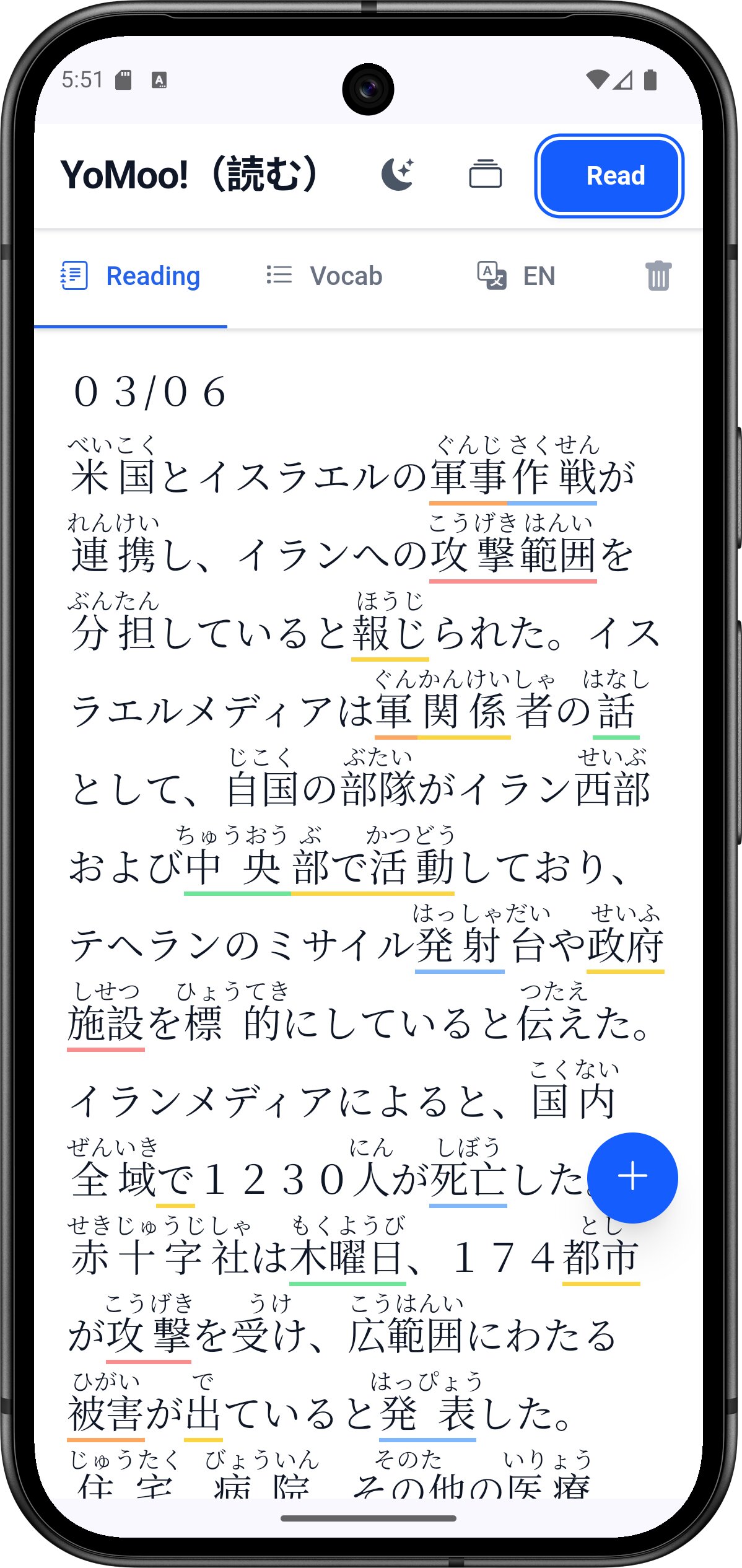
YoMoo Japanese reading view displaying furigana phonetic readings above every kanji character, color-coded by JLPT level from N5 to N1, with text-to-speech controls

Furigana Reading Mode

JLPT color-coding on every word — tap any kanji for the definition

YoMoo dictionary lookup popup modal showing Japanese word kanji, hiragana reading, English definition, part of speech label, and JLPT level badge with one-tap add to vocabulary button

One-Tap Dictionary Lookup

Reading, definition, JLPT level — without leaving the article

YoMoo article vocabulary tab showing all Japanese words extracted from a news article with kanji, hiragana readings, English definitions, and JLPT level badges filterable by N5 through N1

Article Vocabulary Tab

All words extracted — save or export in bulk, filter by JLPT level

YoMoo Japanese news articles list showing article titles in Japanese with English translations, publication dates, and reading difficulty indicators for JLPT practice

News Article Library

Real Japanese news — browse with English titles to pick your topic

YoMoo vocabulary quiz mode showing multiple choice Japanese vocabulary question built from words saved while reading news articles, with JLPT level badge visible

Vocabulary Quiz Mode

Multiple-choice quiz built from words you saved while reading

YoMoo flashcard mode showing a Japanese vocabulary word on a flip card with options to reveal the answer, mark easy or hard for spaced repetition scheduling

Flashcard Mode

Flip, self-rate, and let SRS schedule the next review

YoMoo personal vocabulary list showing saved Japanese words with kanji, hiragana readings, English definitions, JLPT level filters, and export to Anki options

Personal Vocabulary List

Saved words filtered by JLPT level — export to AnkiDroid any time

YoMoo English translation tab showing full English translation of a Japanese news article displayed alongside the original text for reading comprehension practice

English Translation

Full translation on demand — cached for 30 days after first load

YoMoo OCR media picker modal showing options to scan Japanese text from camera photo, upload image file, or import PDF document for furigana analysis

OCR & File Import

Scan text from photos, import PDFs, DOCX, or SRT subtitle files

YoMoo analyze your own text screen with Japanese text paste field, analyze button, and tabs for reading view, vocabulary list, and English translation

Analyze Your Own Text

Paste from manga, emails, or websites — full furigana and lookups

YoMoo news articles category selection screen showing Politics, Business, Science, International, Society, Sports, and Japan Focused categories with article counts for JLPT reading practice

Browse by Category

Politics, Science, Sports, Society and more — updated daily

YoMoo JLPT level content selection modal showing N5 through N1 reading practice passages with article counts for structured Japanese language exam preparation

JLPT Practice Passages

N5 through N1 — official-style reading comprehension, offline

See It In Action

Watch YoMoo read Japanese news — furigana on every word

See how YoMoo instantly generates furigana above every kanji as you open a real Japanese news article. Tap any word for the dictionary popup. Switch on text-to-speech and follow along with synchronized sentence highlighting.

The entire workflow — open article, read with furigana, look up unknown words, save to vocabulary — takes about 30 seconds to learn. The hard part is the Japanese. YoMoo handles the rest.

YoMoo in action — real Japanese news with furigana & TTS

Content Library

From JLPT practice to native literature — all in one place.

Six content sources cover every ability level. Every article is pre-processed with curated vocabulary lists, English translations, and simplified versions — so the reading support is already there when you open it.

No other free Japanese reader app offers real-time furigana on imported PDFs, camera OCR, Aozora Bunko literature, and pre-simplified news articles in a single free package.
Every article includes
Curated vocabulary list with JLPT levels
Pre-cached English translation
Simplified version at N4-N5 level
Text-to-speech with sentence highlighting
Completion tracking and bookmarks

JLPT Practice Passages

N5N4N3N2N1

Official-style reading comprehension passages for all five JLPT levels. Bundled locally — works fully offline. Structured exam prep without leaving the app.

Japanese News Articles

N3–N1

Real Japanese news covering politics, business, science, culture, and international affairs — updated regularly. Every article includes a pre-simplified N4-N5 version, full TTS, English translation, and curated vocabulary list.

How-To Articles

N3–N2

Practical Japanese guides on daily life, health, technology, and emergency preparedness. Bilingual content — Japanese with English reference alongside. Good for N3 learners building reading stamina on practical topics.

Aozora Bunko — Japanese Literature

N3–N1

Japan's public-domain classic literature — Sōseki, Akutagawa, Dazai, and hundreds more. Fiction, poetry, essays, and folklore. If you have tried to read Japanese short stories for beginners and want to go further, start here.

Japanese Wikipedia

N2–N1

Live access to Japanese Wikipedia across 9 subject categories — science, history, culture, technology, geography, politics, economy, sports, and society. Unedited native Japanese with full furigana support.

Your Own Content

Any level

Camera OCR, PDF or DOCX upload, SRT subtitle files, or paste any Japanese text. Analyze manga, menus, work documents, or anime subtitles. Everything gets the full furigana engine and dictionary lookups.

JLPT Level Guide

Who YoMoo is actually for.

YoMoo works from N5 through N1, but it is most useful for learners who can already read hiragana and katakana — typically N4 through N2. If you are still learning the kana, the JLPT Practice Passages section is the right starting point. If you try to read NHK News on your first day and find it impossible, that is not a bug.

The simplified N4-N5 versions of news articles exist specifically for learners who want to engage with real topics but are not yet comfortable with unedited native Japanese. Read the simplified version first, then try the original.

JLPT level guide — recommended content in YoMoo by level
LevelVocabularyBest Content in YoMoo
N5~800 wordsJLPT N5 Passages, simplified news articles
N4~1,500 wordsN4 Passages, simplified news, How-To articles
N3~3,750 wordsN3 Passages, current news (original), How-To (all)
N2~6,000 wordsCurrent news, Aozora Bunko (accessible works)
N110,000+ wordsAll sources, full Aozora library, Japanese Wikipedia
Japanese Reading Practice

How to actually get better at reading Japanese

The fastest way to improve is reading more. The problem is that reading Japanese without support is slow enough to feel pointless, and switching between apps to look things up breaks the flow until you give up. YoMoo keeps everything in one place so you can read Japanese without stopping.

易しい

Start with Easy Japanese

Every news article has a simplified version rewritten at N4-N5 difficulty. Shorter sentences, common vocabulary, same story. Read the easy Japanese version first, then switch to the original when you feel ready. No other free app does this.

読む

Read Japanese with Furigana

Furigana appears above every kanji automatically — real-time, not pre-annotated. You can read Japanese texts you bring in yourself: paste an article, upload a PDF, scan a menu with the camera. The reading support travels with the content.

練習

JLPT Reading Practice, N5–N1

Dedicated JLPT reading comprehension passages for every level are bundled offline. If your exam is three months out and you need structured Japanese reading practice, start here before moving to live news articles.

How YoMoo Compares

The Japanese reading app that does more

Other apps do some of this. None do all of it free, in one place, with real-time furigana on anything you import.

Feature comparison between YoMoo and other Japanese reading apps
FeatureYoMooOther Reading Apps
Real-time furigana on any text (including imported)pre-annotated only
Text-to-speech with sentence highlightingrarely
Simplified N4-N5 version of every news article
One-tap dictionary from reading view
Built-in SRS vocabulary — quiz and flashcards
Direct Anki / CSV export
Curated JLPT passages (N5–N1), offlinesome
Classic Japanese literature (Aozora Bunko)
Camera OCR — scan Japanese text on-devicerarely
PDF, DOCX, SRT subtitle file import
No account or subscription requiredoften required
★ 5-Star Reviews · Google Play

What learners are saying

"
★★★★★

Great app for reading and learning Japanese

Play Store User
Verified Review · Google Play
"
★★★★★

Awesome app for practicing Japanese reading daily

Play Store User
Verified Review · Google Play
"
★★★★★

By far the best Japanese reading app on the Play Store. I can actually read Japanese when using YoMoo!

Play Store User
Verified Review · Google Play
How It Works

From article to learned vocabulary in four steps

1. Choose an Article

Browse by source and JLPT level, or paste any Japanese text. Filter by category, choose the original or simplified version. Recently Read keeps your place across sessions.

2. Read with Support

Furigana on every kanji. Tap any word for the definition. Let TTS read it aloud while you follow along. Simplify or translate with one tap. No switching apps.

3. Save Vocabulary

Add words individually or in bulk from the article vocabulary tab. Each is saved with reading, definitions, JLPT level, and part of speech. Filter by level to review only what you need.

4. Review & Retain

SRS schedules reviews at the right intervals. Quiz and flashcard modes keep it from becoming passive. Export to AnkiDroid whenever you want to bring words into your existing workflow.

FAQ

Frequently Asked Questions

Things people ask before downloading.

Is YoMoo really free? What's the catch?
Genuinely free, no account required, no subscription. Furigana, dictionary lookups, TTS, JLPT passages, and SRS vocabulary are all included. Two free articles per source before a rewarded ad is shown — watching a short video unlocks the next articles. The dictionary downloads once on first use (~20 MB). Everything else is ready from the first launch.
How does YoMoo help with Japanese reading practice?
Most Japanese reading practice falls apart because looking things up takes longer than reading. You tap out of the article, open a dictionary, lose your place, lose momentum, close the app. YoMoo keeps you in the text. Furigana is already there above every kanji. Dictionary lookups open as an overlay. TTS reads the sentence aloud so you can check your own reading. When you finish an article, the vocabulary you saved goes into a spaced-repetition queue automatically. Japanese reading practice that actually adds up, session by session.
What JLPT level do I need to start?
You should be able to read hiragana and katakana before using YoMoo. Most of the content is aimed at N4 through N2 — people who know some Japanese but hit a wall when they try to read native text without support. If you are at N5 or early N4, the JLPT Practice Passages section and the simplified versions of news articles are the right starting point. The simplified N4-N5 versions of news articles exist specifically so you can engage with real topics before you are comfortable with full native Japanese.
How is YoMoo different from NHK Web Easy or Todai?
NHK Web Easy and Todai are primarily news-reading tools. YoMoo adds real-time furigana on any text you give it — not just pre-processed content — along with an inline dictionary that works offline, a full spaced-repetition vocabulary system with Anki export, camera OCR, PDF and DOCX import, Aozora Bunko literature, and Japanese Wikipedia. It also pre-simplifies its own news articles to N4-N5 level, which is something neither competitor offers for free.
Does YoMoo work offline?
Partially. The dictionary (170,000+ entries), your saved vocabulary, SRS review queue, and the complete JLPT practice passage library are stored locally and work without a connection after the first download. Live news articles, Wikipedia, and on-demand translations require internet access. Once an article's translation or simplified version has been loaded once, it is cached locally for 30 days. On Android, the camera OCR also works fully offline via ML Kit.
How does the Japanese text-to-speech work?
The TTS engine reads entire articles aloud with synchronized sentence highlighting — the current sentence is highlighted as the audio plays so you can follow along. On native Android, YoMoo uses the Android TTS engine, which produces noticeably better Japanese voice quality than browser-based alternatives. You can also tap any word in the dictionary popup to hear it pronounced in isolation. TTS works on all content sources, including articles you paste or import yourself.
Can I import my own Japanese content?
Yes. Paste any Japanese text directly, upload a PDF, DOCX, or PPTX file, import an SRT subtitle file (useful for anime), or use the camera OCR to capture text from a photo. Once imported, the content gets the same furigana engine, dictionary lookups, TTS, vocabulary saving, and translation as built-in articles. No other free Japanese reader allows you to import your own documents and run full morphological analysis on them.
How does the SRS vocabulary system compare to Anki?
YoMoo's built-in SRS uses intervals of 4h → 8h → 24h → 3 days → 1 week → 1 month. Quiz mode is multiple-choice; flashcard mode is self-rated. It is designed for zero-friction saving while you read — tap a word, tap save, it enters the review queue. If you already use Anki, you can export your vocabulary directly to AnkiDroid or as a UTF-8 CSV at any time. Most learners who use both find YoMoo handles the reading-integrated review while Anki manages longer-term retention of older decks.
Is YoMoo available on iPhone (iOS)?
YoMoo is currently Android-only on the Play Store. iOS users can access the browser-based version at my-senpai.com/analyzer/yomoo/, which offers core reading functionality — furigana, dictionary lookups, vocabulary saving, and text import — from any browser. You can also install it as a PWA directly from Safari: tap the share icon (the box with the upward arrow in the Safari toolbar) and choose Add to Home Screen. This gives you a dedicated app icon and a more app-like experience on your iPhone or iPad. Camera OCR and native TTS quality require the Android app.
How do I add YoMoo to my iPhone home screen as an app?
Open my-senpai.com/analyzer/yomoo/ in Safari on your iPhone or iPad. Tap the share icon — the box with an upward arrow in the Safari toolbar — then choose Add to Home Screen. Give it a name and tap Add. YoMoo will appear on your home screen like a native app. This installs YoMoo as a Progressive Web App (PWA): it opens full-screen with no browser chrome, and the offline dictionary (~20 MB) downloads once on first launch. Furigana, dictionary lookups, TTS, vocabulary export, and all reading content work on iOS. Camera OCR is Android-only. Note: use Safari — Chrome and Firefox on iOS do not support Add to Home Screen.
iPhone & iPad

Add YoMoo to your iPhone home screen

YoMoo is a fully installable Progressive Web App. No App Store, no sign-up — just three taps in Safari and you're reading Japanese with a home screen icon.

1

Open YoMoo in Safari

Go to my-senpai.com/analyzer/yomoo/ in Safari on your iPhone or iPad. The app will load — you'll see the YoMoo!(読む) header and the Japanese text input. No account or sign-up is needed. Note: this must be Safari — Chrome and Firefox on iOS don't support home screen installation.

2

Tap the share icon in the Safari toolbar

Look for the box with an upward arrow — on iPhone it sits in the toolbar at the bottom of the screen; on iPad it's at the top next to the address bar. Tap it to open the Safari share sheet.

3

Tap "Add to Home Screen"

Scroll through the share sheet and tap Add to Home Screen. The name will default to YoMoo — you can leave it or change it. Tap Add in the top-right corner to confirm. That's it.

Done — YoMoo opens like a native app

Tap the YoMoo icon on your home screen. It opens full-screen with no browser bar or tabs — just the app. The following features all work on iOS:

Furigana on any text you paste or import
One-tap dictionary lookups with JLPT levels
Text-to-speech audio playback
Vocabulary list with Anki and CSV export
News articles, JLPT passages, and Aozora Bunko
English translation tab
Offline dictionary after first load (~20 MB, one-time)
Camera OCR — Android app only (ML Kit on-device)

The offline Japanese dictionary downloads once on first launch and works without a connection after that. No account needed — ever.

Open YoMoo in Safari

Then: share icon → Add to Home Screen → Add

Start reading real Japanese today.

No account. No subscription. No paywall on core features. Install, open the app, and start reading. The dictionary downloads once on first use. Everything else is ready immediately.