YoMoo
How YoMoo works
YoMoo is a Japanese reading app with furigana for learners who can read kana. You open a text, read it with furigana and JLPT colours, tap any word for its meaning, and the words you save come back for review. This page goes through each step.
Choosing a text
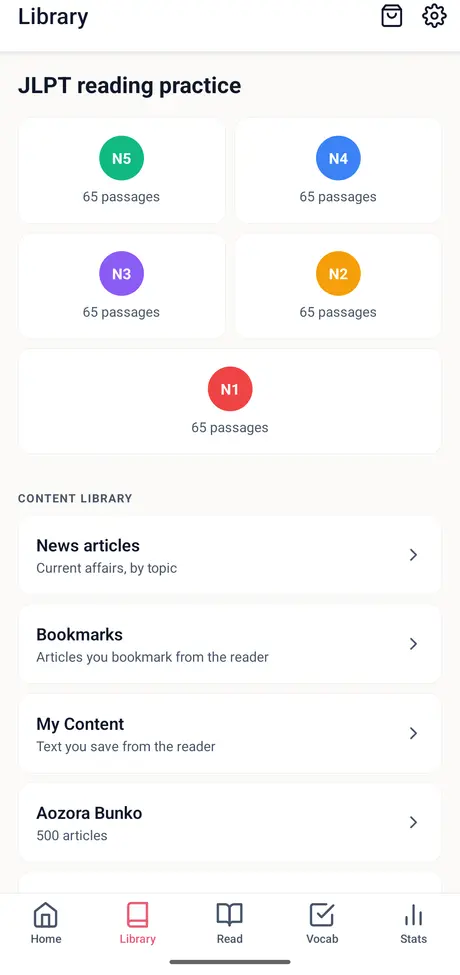
Everything opens in the same reader. The Library has five kinds of Japanese:
| Text | What it is | On the phone apps |
|---|---|---|
| JLPT practice passages | 65 reading passages for each level from N5 to N1, 325 in all | 5 free, then 1 ad each |
| News | Current news in eight topics, each with an English translation, a word list and an Easy version | 5 free, then 1 ad each |
| How-To articles | 400 practical guides on daily life, health and technology | 5 free, then 1 ad each |
| Aozora Bunko | 500 public-domain classics such as 羅生門, こころ and 雨ニモマケズ | Always free |
| Your own Japanese | Paste text, scan a page or photo with the camera, or open a .txt, .srt or .vtt file | Always free |
The five free articles are counted together across passages, news and How-To. Your own text, Aozora Bunko books and the sample text do not use one up. If you are new to readings above kanji, what furigana is and when to turn it off is a two-minute primer.
Furigana and JLPT colours
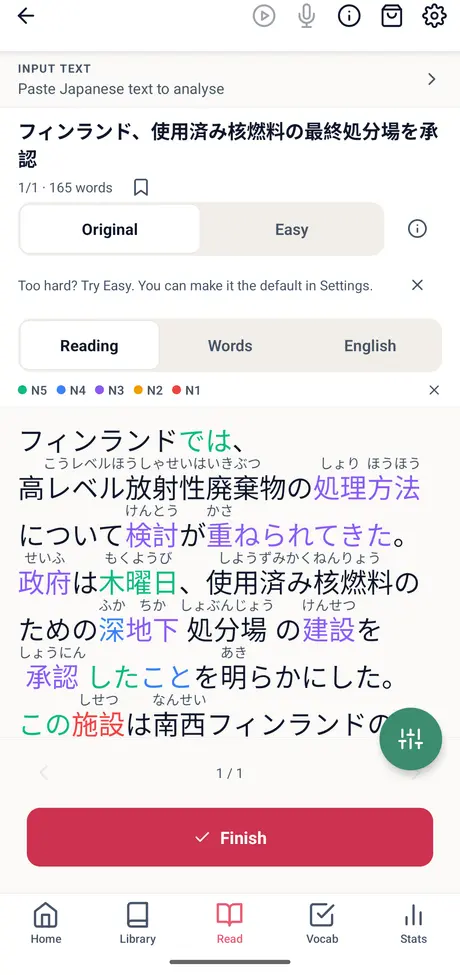
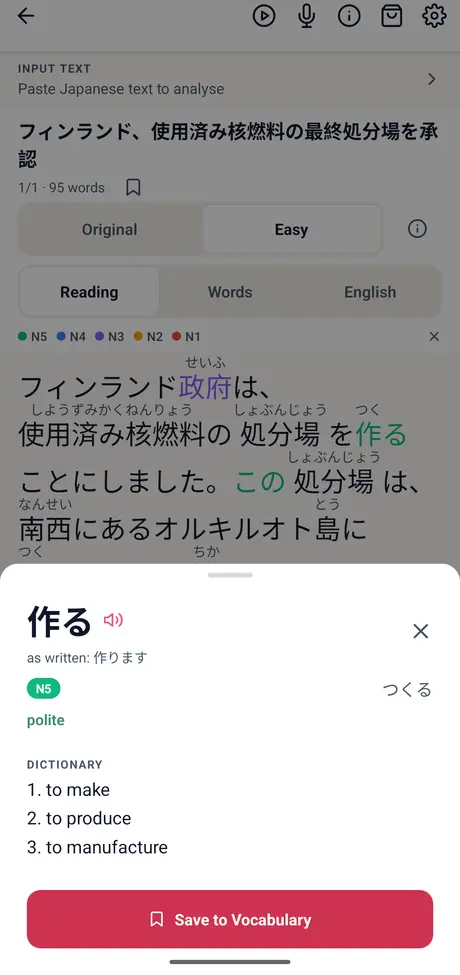
Every kanji gets furigana, the small hiragana reading above it, and every word is coloured by its JLPT level from N5 to N1. At a glance you can see how much of a text sits at or below your level.
The level on each word comes from JLPT word lists for the word itself (since version 0.31.1). Before that, many words took the level of their first kanji, so 犬 showed as N4 and 企業 as N1. Readings come from YoMoo's own dictionary; names the dictionary does not list are marked as a best guess.
The Easy version
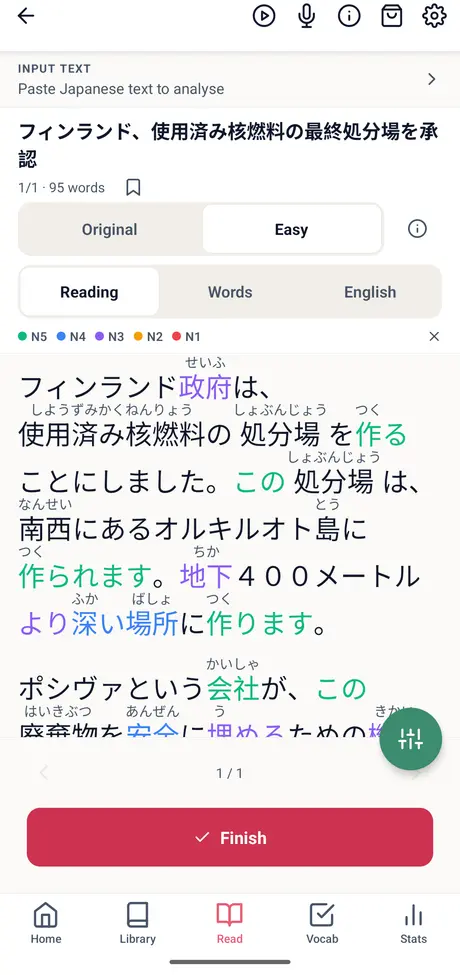
Every news article has two versions. Original is the full article. Easy is a shorter version written by AI from the original, with everyday words and plain grammar, and it is labelled Easy in the reader. In the example on the YoMoo page, a story goes from 165 words to 95.
- Switch between Original and Easy on the Read screen, article by article, or set your default in Settings.
- Furigana, the word list and the English translation all follow the version you pick.
- Details in Easy can differ from the original, so the Original version is always one tap away.
One-tap meanings
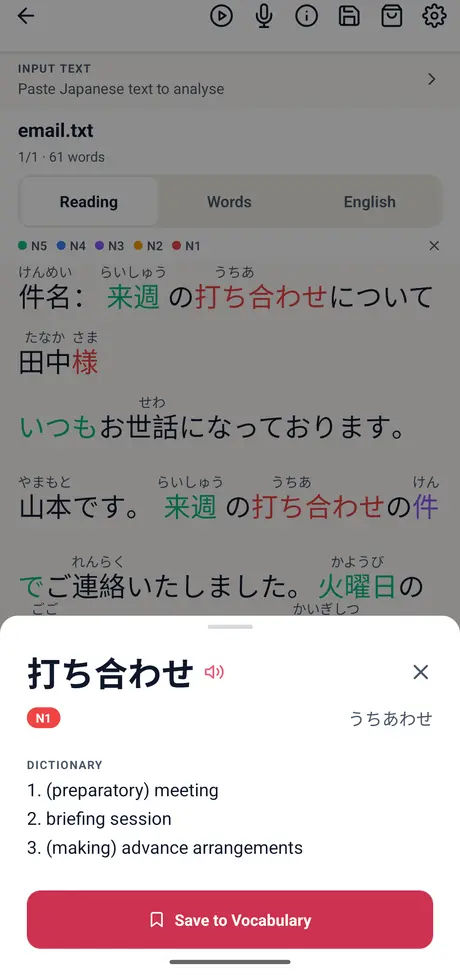
Tap any word and a word sheet opens with its reading, meanings and JLPT level. Conjugated verbs open at their dictionary form, so 作ります shows as 作る, marked polite. The dictionary is built into the app: more than 250,000 words and readings from JMdict and JMnedict, the open Japanese dictionary projects (CC BY-SA 4.0).
Saved words and review
- Save: save a word from its word sheet as you read.
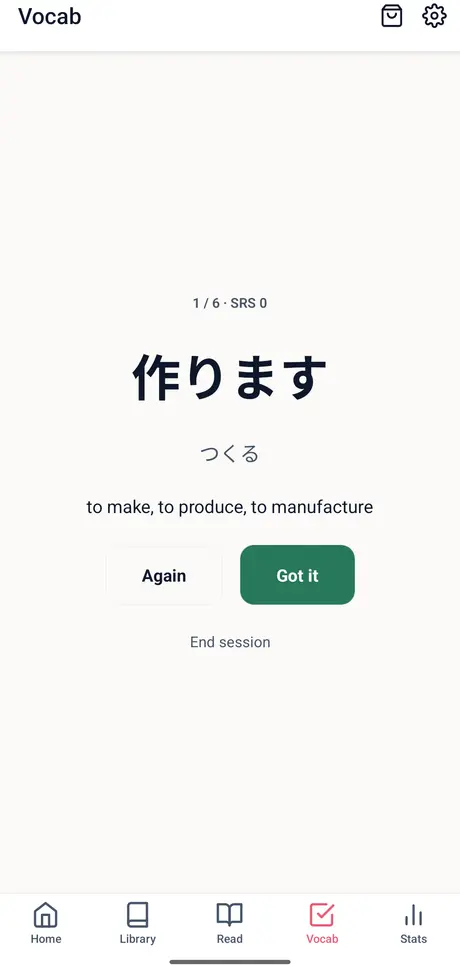
- Review: saved words come back when they are due; answer Again or Got it. Once you have four words, a quiz and flashcards open too.
- Reminders: after your first saved word, YoMoo offers a reminder for when words are due or your reading streak is about to end. One a day at most, and you can turn it off in Settings.
- Pick up where you stopped: Home opens on the article you were reading, the words due today and your streak.
- Export: Vocab, then Manage words, then Export words saves a CSV file (word and reading first) that Anki and spreadsheets open, on Android and iPhone.
Any article can also become listening practice: the microphone button plays a sentence for you to repeat aloud, at 0.75× to 1.1× speed. YoMoo does not record or score your voice; for scored speaking practice, use FluencyTool.
The free limit and the ad-free subscription
- Always free: furigana, the dictionary, text-to-speech, saving and reviewing words, listening practice, Aozora Bunko and your own text. No account needed.
- Articles on the phone apps: 5 free news, JLPT passage or How-To articles in total, then a short ad unlocks each new article. Articles you opened stay open.
- Translate (beta): pages of text you paste or import can be translated into English; free users watch one ad per page, ad-free members get 5 pages a day.
- Ad-free subscription: optional, monthly or yearly. It removes the ads and the article limit, and the store shows the price in your currency before you subscribe.
To see the reader before installing, try one article in the browser: the web version opens 1 new article a day.
Read your first article
Free on Android, iPhone and iPad, with no account. In the browser, YoMoo opens one new article a day.
YoMoo questions
Do I need to read hiragana and katakana before using YoMoo?
Yes. Furigana is written in hiragana, so YoMoo helps once you can read kana. Kana Challenge, also by My Senpai, teaches both scripts first.
Who writes the Easy version of an article?
Easy is written by AI from the original article, as a shorter version with everyday words and plain grammar, and it is labelled Easy in the reader. Details can differ from the original, which is always one tap away.
How many articles can I read for free?
On the phone apps, 5 news, JLPT passage or How-To articles are free in total, and after that a short ad unlocks each new one. Articles you already opened stay open. Aozora Bunko texts and your own text are always free and do not use up a free article.
Can I read my own Japanese text?
Yes. Paste text, scan a printed page or a photo with the camera, or open a .txt, .srt or .vtt file. YoMoo adds furigana, JLPT colours and one-tap meanings. PDF and Word files cannot be opened directly; copy their text and paste it.
Can I try YoMoo in the browser?
Yes. The web version at my-senpai.com/analyzer/yomoo/ has the same reader and dictionary and opens 1 new article a day. The phone apps have more articles, review and reminders.