My Senpai Crossword
My Senpai Crossword updates
What changed in each version of the daily Japanese crossword, newest first. A version is listed once it is live on Google Play and the App Store.
How the dates work. The iPhone date is the release date in the App Store version history. The Android date is the first day Google Play's install reports show the build reaching players. Some versions were Android only, and on iPhone some versions were skipped and their changes arrived in the next one. The web player was updated to 1.0.49 on 29 October 2026.
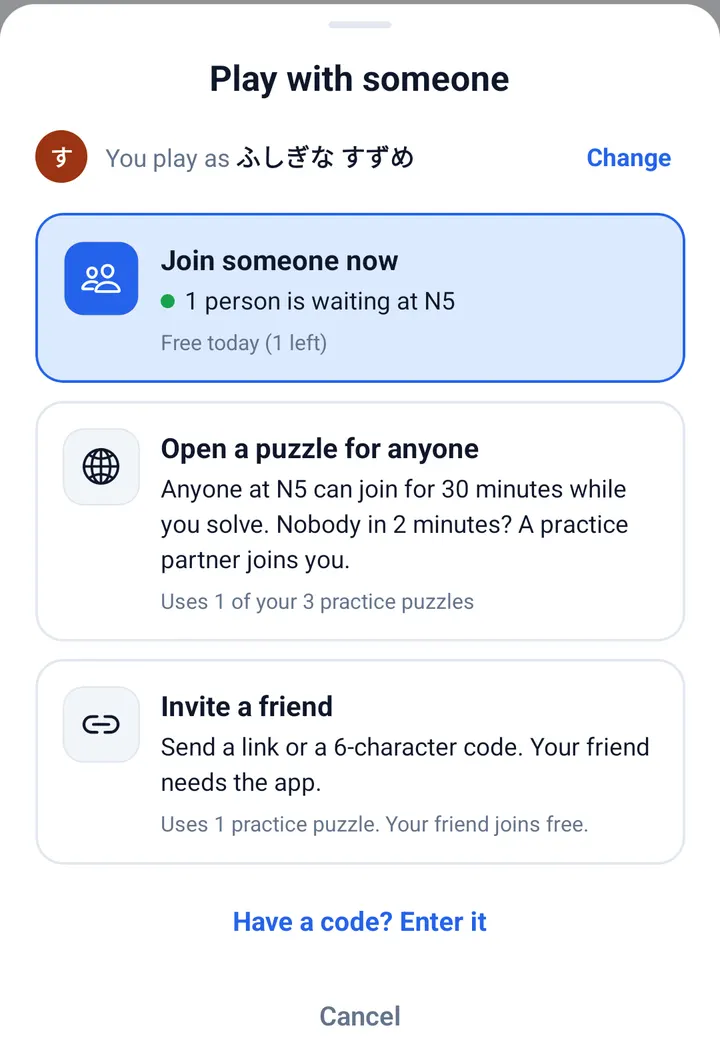
Version 1.0.49: Together mode v2
iPhone: 31 October 2026 · Android: live on Google Play by 1 November 2026
- One button, Play with someone, shows every way to play together: join someone waiting, open a puzzle for anyone, invite a friend, or enter a code.
- When people are waiting at your level, Together moves to the top of the home screen; before you join you see the puzzle, how many letters are filled and which colour your letters will be.
- While you wait, a strip under the grid counts down until a practice partner joins; when someone joins, a short card says who they are and where they are from.
- Each player has a coloured initial, and a practice partner is always marked PRACTICE. Leaving asks one question: leave for now, or leave for good.
Version 1.0.48: play with anyone, and a practice partner
iPhone: 28 October 2026 · Android: included in the current Google Play version (1.0.49)
- Invite and choose Anyone to list your puzzle for 30 minutes; open puzzles show behind the globe on the home screen and in a list by JLPT level, and one tap joins.
- If nobody joins within 2 minutes, a practice partner joins you. It knows about 60% of the words, types one letter at a time and leaves the last letter to you.
- Settings has a Together tab: turn open puzzles off if you only want to play with friends.
- Everyone gets a Japanese nickname such as あかい きつね; reroll it or type your own. An ad that does not get you a seat becomes a credit for your next join.
Version 1.0.47: readable clues and a tablet clue panel
iPhone: 27 October 2026 · Android: 26 October 2026
- Larger, easier-to-read clue text.
- On tablets, a side clue panel with its own Hide button, and the grid re-centres when the screen size changes.
- Usability fixes for playing with a friend.
Version 1.0.46: puzzles load again (Android only)
Android: 25 October 2026 · not released on iPhone (not needed)
- Fixed an error on Android 1.0.45 that stopped puzzles from loading; the iPhone build was not affected.
Versions 1.0.44 and 1.0.45: invites and a corrected word list
iPhone: 25 October 2026 (1.0.44) · Android: 25 October 2026 (1.0.45)
- Solve a crossword with a friend, live: tap Invite on a practice puzzle and send the link or the six-character code. You both fill the same grid, each in your own colour, with one shared clock.
- A friend who installs the app from your invite finds the code ready on first launch, and invite links open the app directly when it is installed.
- Fixed the keyboard opening and closing by itself during a puzzle.
- A corrected word list: about 340 words that sat at the wrong JLPT level were moved, and 17 duplicate entries were merged.
- One free puzzle with a friend each day, plus 3 free practice puzzles and the daily puzzle.
Earlier versions
- 1.0.40 (iPhone 11 October 2026): ads play with the sound off by default; the upgrade screen shows prices right away, and the store lists the best-value bundle first.
- 1.0.37 and 1.0.38 (iPhone 28 and 29 September 2026): after you solve a puzzle the app may ask for a rating, at most once every 60 days, with no ad over that request; stability fixes for iPhone and iPad.
- 1.0.36 (iPhone 24 September 2026): bug fixes, including a smoother keyboard on iPad.
- 1.0.34 (iPhone 17 August 2026): the puzzle can use your phone's own keyboard.
- 1.0.30 and 1.0.31 (iPhone 29 May and 15 June 2026): the first App Store releases.
Found a wrong clue or a bug? Email fluencytool@my-senpai.com with the level and the clue.
Get the latest version
Free on Android and iPhone, or play the daily puzzle in your browser. No account needed.