JLPT practice passages
65 reading passages for each level from N5 to N1, 325 in all. Pick your level and read at exam length.
5 free, then 1 ad each

YoMoo is a free Japanese reading app for learners who can read kana. It puts furigana and JLPT colours on news, JLPT practice passages, Aozora Bunko literature and your own text, shows the meaning of any word in one tap, and saves the words you look up for review.
酔っ払った乱暴で、酒屋で倒れているのが見つかったアライグマ
Raccoon found passed out in liquor store after drunken rampage
Original · 8 words at N2 or N1
バージニア州アッシュランドの酒屋の従業員は、床に割れた瓶が散乱し、中身がこぼれているのを発見しました。従業員はトイレで小さなアライグマが眠っているのを見つけました。地元の動物管理官であるサマンサ・マーティンによると、店が閉まっている間に天井タイルを破って侵入し、スコッチとウイスキーが保管されていた棚の上に落ちたそうです。
Easy · 5 words at N2 or N1
アメリカのバージニア州アッシュランドにあるお酒屋さんで、お店の人が床に割れた瓶がたくさん落ちているのを見つけました。トイレには、小さなアライグマが寝ているのが見つかりました。お店は閉まっている間に、天井のタイルを壊して入ってきて、お酒が置いてある棚の上に落ちたそうです。
Tap any word for its reading, meaning and JLPT level.
Article: Wikinews, CC BY 2.5, translated into Japanese and simplified by YoMoo. Easy is written by AI from the original; details can differ, and Original is the source wording. Readings, meanings and levels come from the app's own dictionary.
Every news article in YoMoo comes in two versions. Original is the full news Japanese. Easy is a shorter, simpler rewrite of the same story with everyday words and plain grammar, so you can read the news before you are ready for the original.
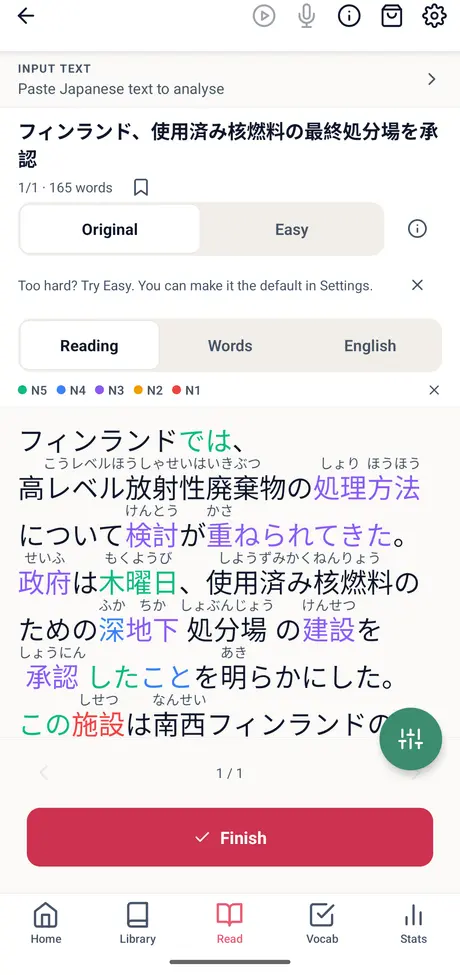
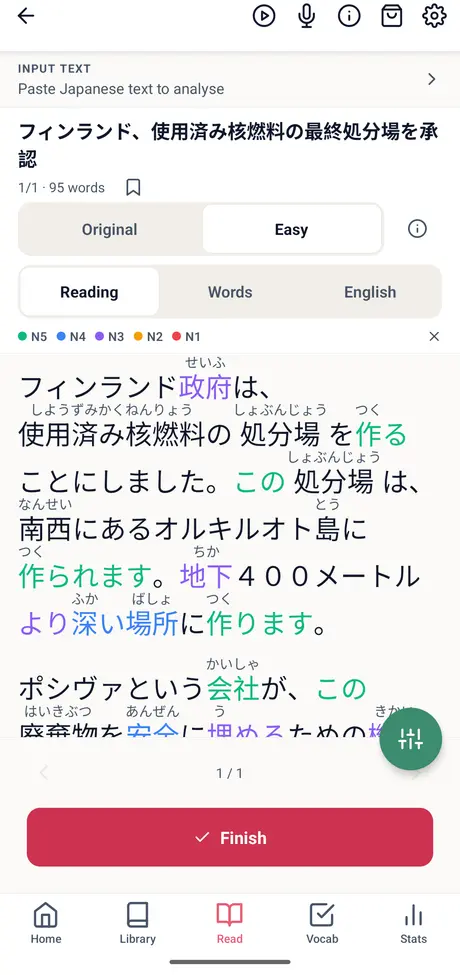
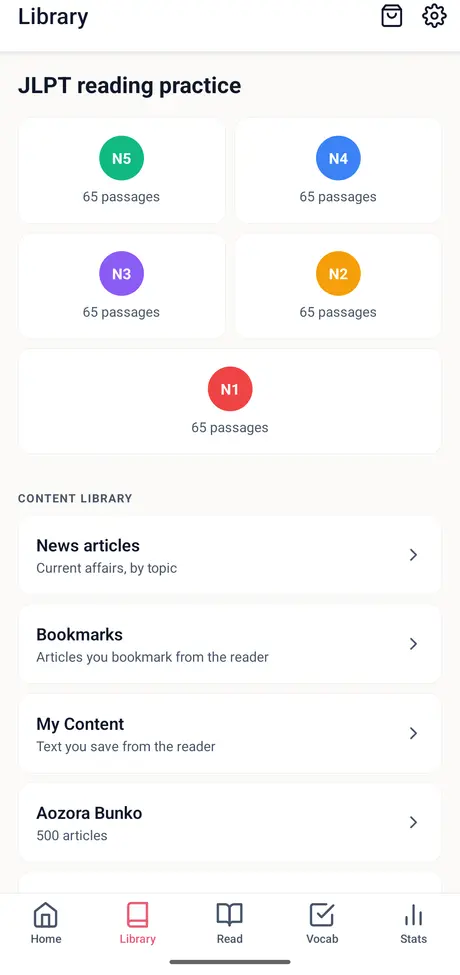
Five kinds of Japanese, from graded exam passages to classic literature to the text you bring yourself. Each one opens in the same reader with furigana, JLPT colours and one-tap meanings.
65 reading passages for each level from N5 to N1, 325 in all. Pick your level and read at exam length.
5 free, then 1 ad each
Current news in eight topics, from society and science to business and sport, each with an English translation and a word list.
5 free, then 1 ad each
400 practical guides on daily life, health and technology. Good for building reading stamina on useful topics.
5 free, then 1 ad each
500 public-domain classics such as 羅生門, こころ and 雨ニモマケズ, for when you outgrow learner texts.
Always free
Paste text, scan a printed page or a photo with the camera, or open a text or subtitle file (.txt, .srt, .vtt). PDF and Word files are not supported. How learners use it.
Always free
Many YoMoo learners skip the Library. They bring the Japanese they need or care about: a work email, a document, a restaurant menu, or a story an AI wrote about their hobby. Paste it or scan it, and YoMoo turns it into a lesson with furigana, JLPT colours, one-tap meanings and words to review. Your own text is always free.
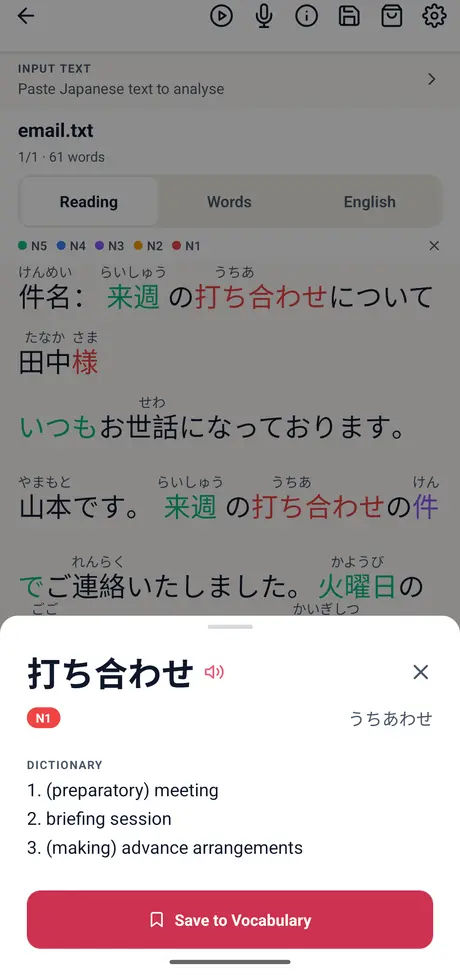
Paste a work or school email and read it properly before you reply. Every word gets its reading, and a tap gives the meaning: 打ち合わせ is a meeting, marked N1. Save the phrases you will need again, and they come back in review.
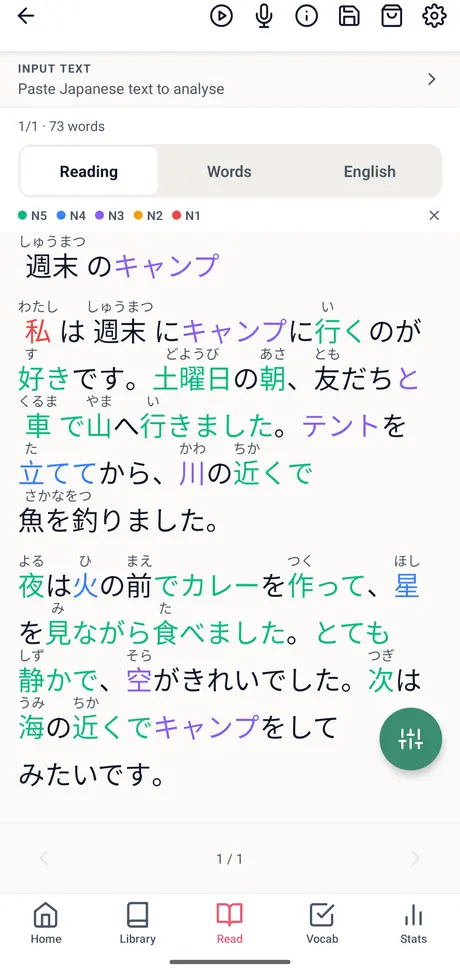
A growing number of learners ask ChatGPT, Gemini or Claude to write Japanese about what they love, at their level, then paste it into YoMoo. The result is reading practice nobody else has: your hobby, your level, with every word explained.
Copy the text out of a document, PDF or web page and paste it, or open a .txt file. Printed pages can be scanned with the camera. PDF and Word files cannot be opened directly yet.
Take a photo or pick one from your gallery. YoMoo reads the Japanese on your phone, then shows you the text to check before you tap Analyse. Recognition can misread less common kanji, so compare it with the photo.
Write a short story in Japanese for a JLPT N4 learner about [your hobby]. Use about 200 characters, short sentences and everyday words. Do not add furigana, romaji or an English translation.
Asking for no furigana or romaji keeps the text clean, because YoMoo adds the readings itself. AI-written Japanese can contain mistakes, and YoMoo shows readings and meanings from its dictionary without checking the grammar, so treat it as practice material and ask the AI to rewrite anything that reads oddly.
Looking a word up is only half the job. YoMoo keeps every word you save, brings it back when it is due, and reminds you when there is something to review.
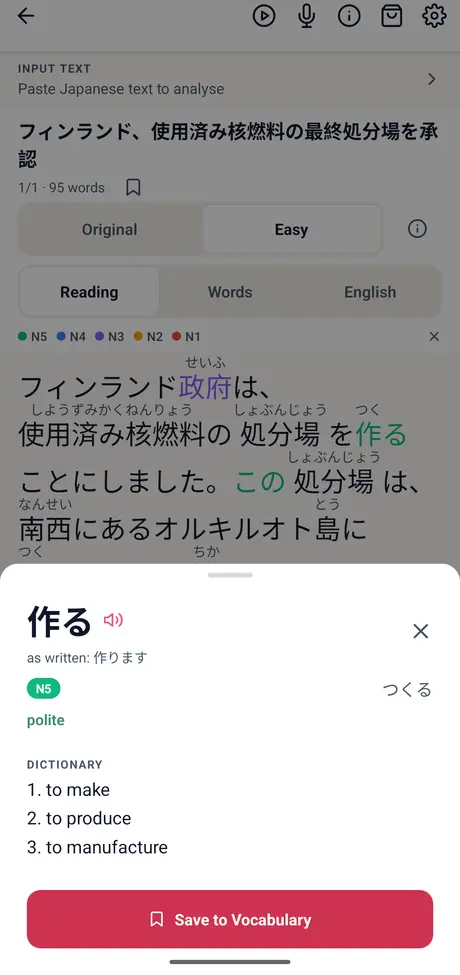
The word sheet shows the reading, meanings and JLPT level. Conjugated verbs open at their dictionary form, so 作ります becomes 作る, marked polite.
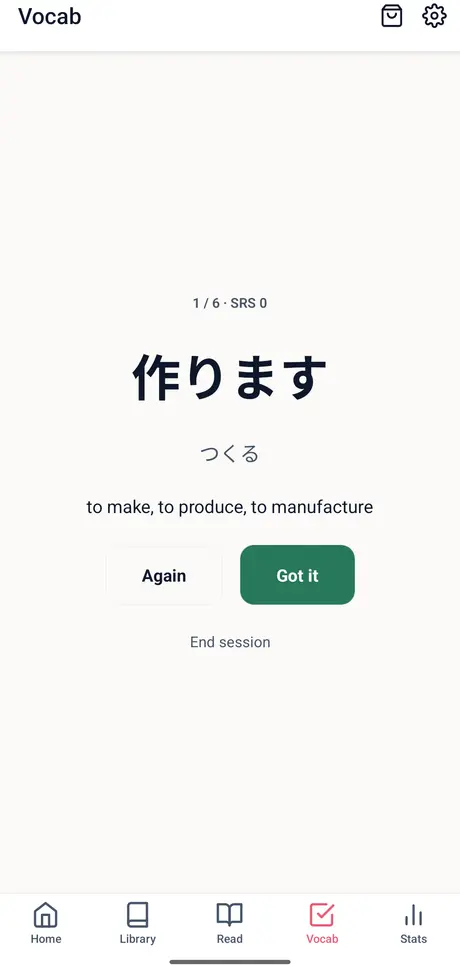
Saved words come back when they are due. Answer Again or Got it. Once you have four words, a quiz and flashcards open too.
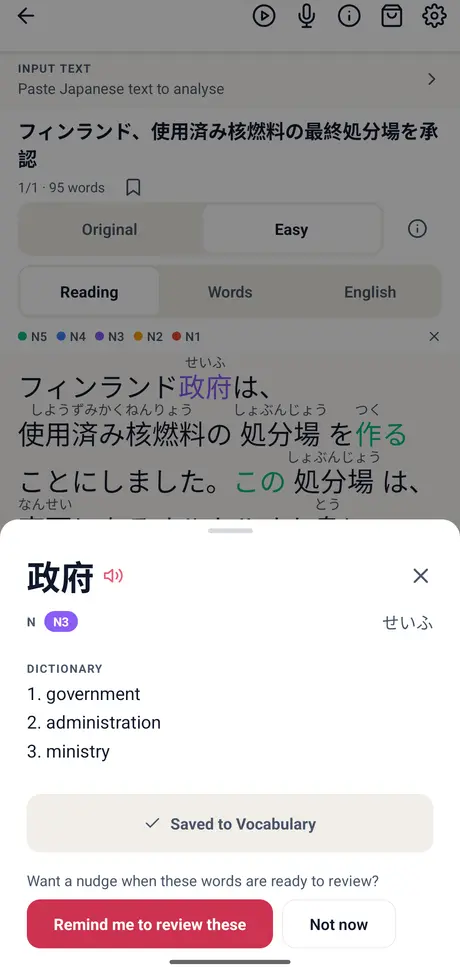
After your first saved word, YoMoo offers a reminder for when words are due. At most one a day, and you can turn it off in Settings.
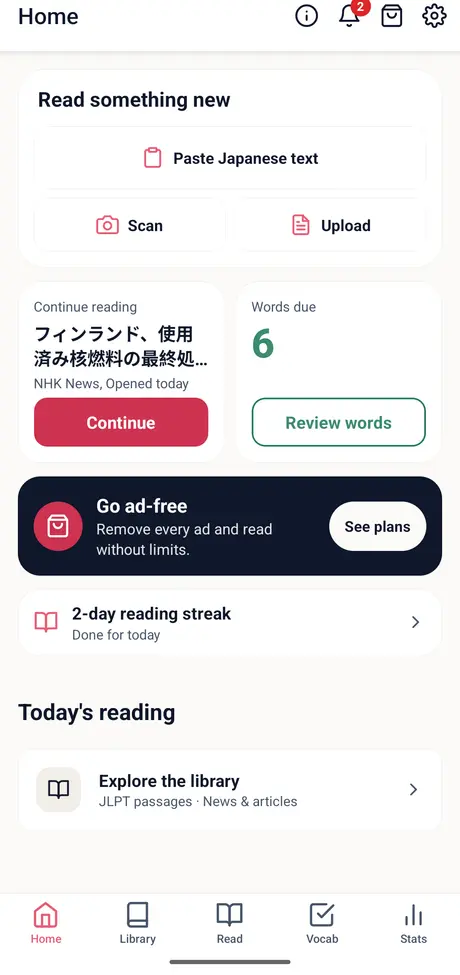
Home opens on the article you were reading, the words due today and your reading streak.
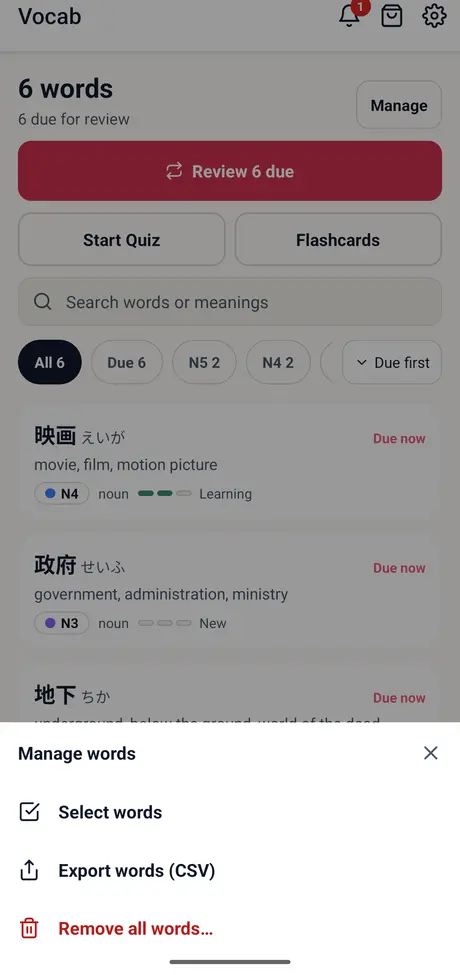
Vocab, then Manage words, then Export words (CSV). The file puts the word and its reading first, so it imports straight into Anki or opens in a spreadsheet. Available on Android now, and on iPhone with the next update.
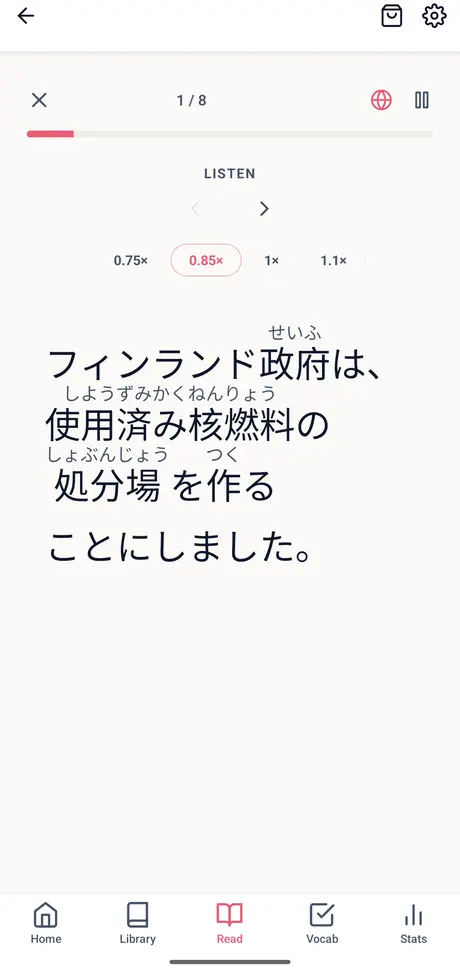
The microphone button turns any article into shadowing practice: hear a sentence, repeat it aloud three times while it plays, and on the last round the text disappears so you recall it from the audio. Speed goes from 0.75× to 1.1×. YoMoo does not record or score your voice. For scored speaking practice, use FluencyTool.
Most learners start by reading the news with a dictionary app open beside it. This is what changes when the help sits inside the text.
| What you need | YoMoo | News site + dictionary app | Printed graded reader |
|---|---|---|---|
| Readings for kanji | Furigana on every kanji, on any text | Only if the site adds them | Printed in the book |
| Meaning of a word | One tap, in place | Copy, switch apps, paste | Glossary, if the book has one |
| Level of each word | JLPT colour on every word | Not shown | One level for the whole book |
| An easier version | Easy switch on every news article | Not available | The book is already simplified |
| Review of new words | Saved words come back when due | You keep your own list | Not included |
| Your own text | Paste, camera scan or file | Not applicable | Not applicable |
YoMoo is built for learners who already read hiragana and katakana. If you are not there yet, start with Kana Challenge. After that, this is where to begin.
| Level | Start with |
|---|---|
| N5 | N5 passages, then Easy news on topics you know |
| N4 | N4 passages and Easy news; save every word you look up twice |
| N3 | N3 passages, Easy news switching to Original, How-To articles. See the JLPT N3 reading plan |
| N2 | N2 passages, Original news, shorter Aozora Bunko texts |
| N1 | N1 passages, Original news and full-length literature |
37 seconds: a news article opens with furigana, the audio plays with each word highlighted, a word is looked up and saved, and the saved words come back as flashcards. More on the My Senpai YouTube channel.
Furigana, the dictionary, text-to-speech, saving and reviewing words, shadowing, Aozora Bunko and your own text. No account needed.
5 free news, JLPT passage or How-To articles in total. After that, a short ad unlocks each new article. Articles you already opened stay open.
The web version opens 1 new article a day, with the same reader and dictionary. Open YoMoo in your browser.
Optional, monthly or yearly. It removes the ads and the article limit. The store shows the price in your currency before you subscribe.
Yes. YoMoo is free to download and needs no account. Furigana, the dictionary, text-to-speech, saving and reviewing words, Aozora Bunko and your own text are free with no limit. On the phone apps, 5 news, JLPT passage or How-To articles are free in total, then a short ad unlocks each new one. An optional ad-free subscription removes the ads and the limit.
Yes. YoMoo adds furigana above kanji, and furigana is written in hiragana, so you need to read kana before YoMoo helps. Kana Challenge, also by My Senpai, teaches both kana sets first.
Easy is a shorter, simpler rewrite of a news article, written by AI from the original, with everyday words and plain grammar. Details can differ from the news report, so the Original version is always one tap away. You can make Easy the default in Settings.
JLPT practice passages for N5 to N1 (65 per level), current news in eight topics with Original and Easy versions, 400 How-To articles, 500 Aozora Bunko literature texts, and any Japanese text you paste, scan or open from a file.
Yes. Paste text, scan a printed page or a photo with the camera, or open a text or subtitle file (.txt, .srt or .vtt). YoMoo adds furigana, JLPT colours and one-tap meanings to it. PDF and Word files are not supported. Your own text is always free.
Yes. Paste an email or the text of a document, open a .txt file, or scan a printed page, menu or sign with the camera. The text becomes a lesson with furigana, JLPT colours and one-tap meanings, and your own text is always free. Text recognition can misread less common kanji, so check the scanned text before you analyse it. PDF and Word files cannot be opened directly; copy their text and paste it.
Yes. Ask the AI to write Japanese at your level about a topic you like, without furigana or romaji, then copy the text and paste it into YoMoo with Paste Japanese text. YoMoo adds furigana, JLPT colours and one-tap meanings, and the words you save come back for review. AI-written Japanese can contain mistakes and YoMoo does not check grammar, so treat it as practice material.
Yes. The Library has 65 reading passages for each JLPT level from N5 to N1, and every word in every text is coloured by its JLPT level, so you can see at a glance how much of a text sits at or below your level.
YoMoo uses JMdict and JMnedict, the open Japanese dictionary projects (CC BY-SA 4.0), with more than 250,000 words and readings built into the app. Conjugated verbs open at their dictionary form, so 作ります shows as 作る, marked polite.
Yes, on Android: open Vocab, then Manage words, then Export words (CSV). The file lists the word and its reading first, so it imports into Anki or opens in a spreadsheet. The iPhone app gets the export in its next update.
No. YoMoo has a listen-and-repeat shadowing mode for any article, but it does not record or score your voice. For speaking practice that scores what you say, use FluencyTool, also by My Senpai.
Yes. YoMoo runs in the browser at my-senpai.com/analyzer/yomoo/ with the same reader and dictionary. The web version opens 1 new article a day; the phone apps have more.
YoMoo is made by My Senpai, a small team in Tokyo that also makes Kana Challenge, FluencyTool and Japanese Crossword. You can reach the team at [email protected] or through a Google Play or App Store review.
Free on Android, iPhone and iPad. No account.
Practice tools for kana, reading, vocabulary, and fluency.