
Home FluencyTool English Track
★ Free · iOS & Android · CEFR A1 → B2

Speaking practice with immediate feedback.

Practice speaking English out loud.

Echo Fluency plays a CEFR-graded sentence, records your repeat automatically, plays your voice back, and evaluates the attempt with speech-to-text. Flashcards, grammar lessons, and vocabulary games use the same English content for review.

Designed for learners from A1 through B2. Already learning Japanese? Try the Japanese track →

Available on iOS & Android · See how it works ↓
4.8 · 320+ reviews Free core · No subscription 🌐 Multi-language UI
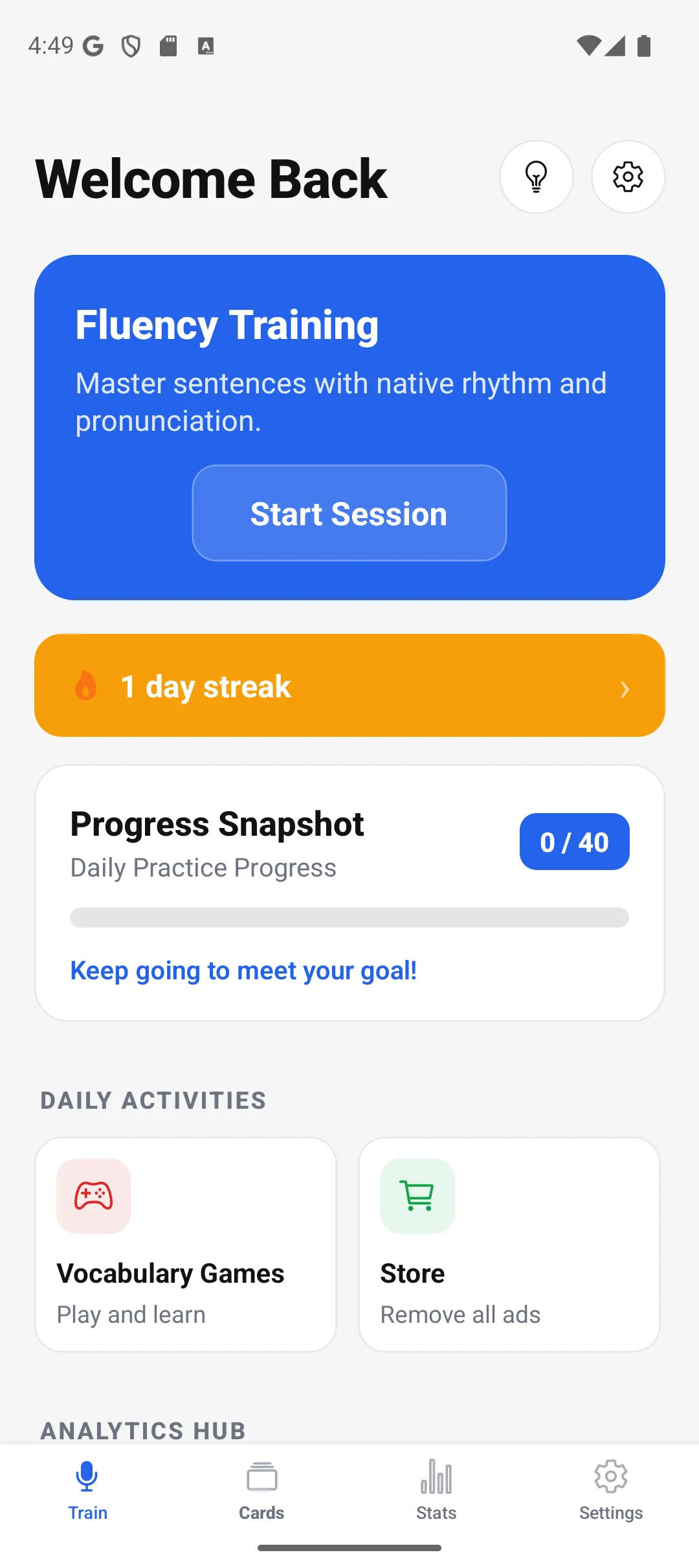
FluencyTool dashboard with daily goal and activity chart
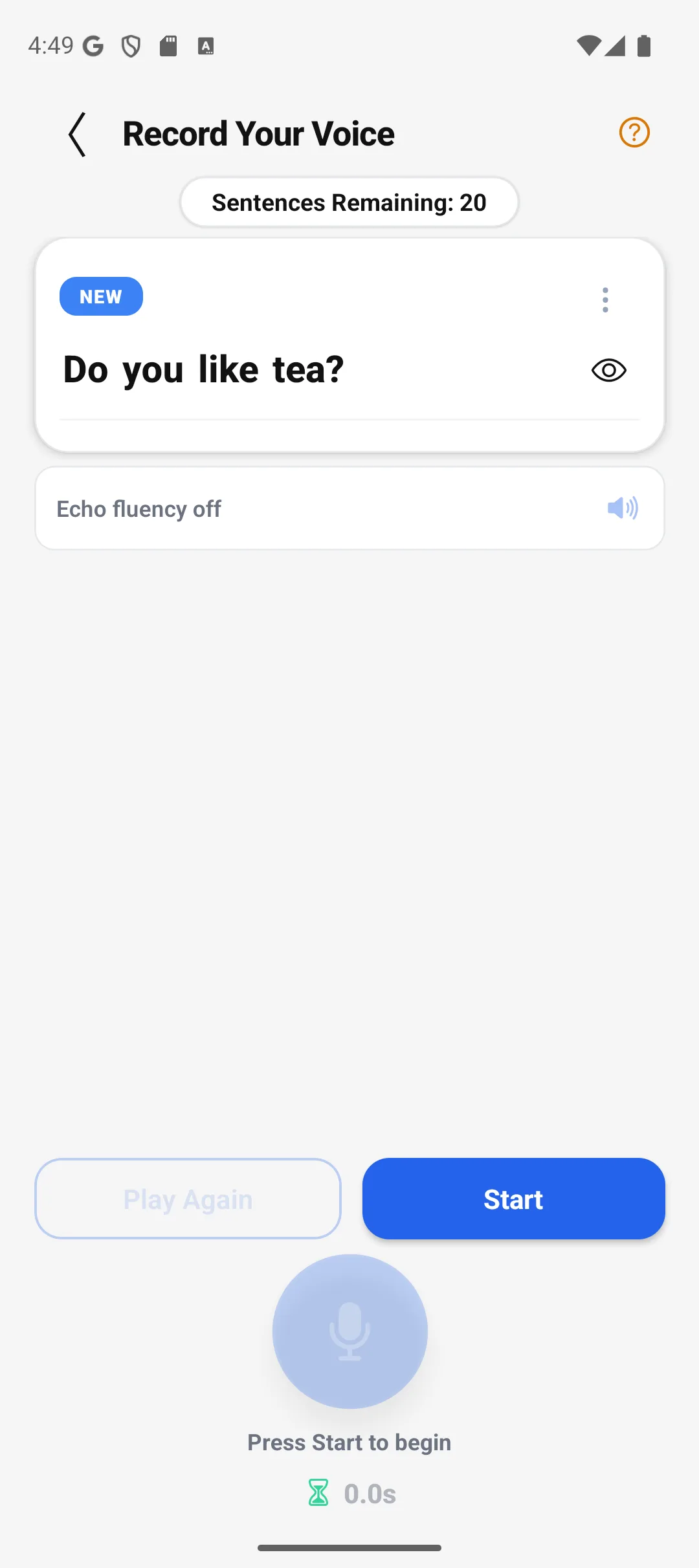
Echo Fluency recording screen
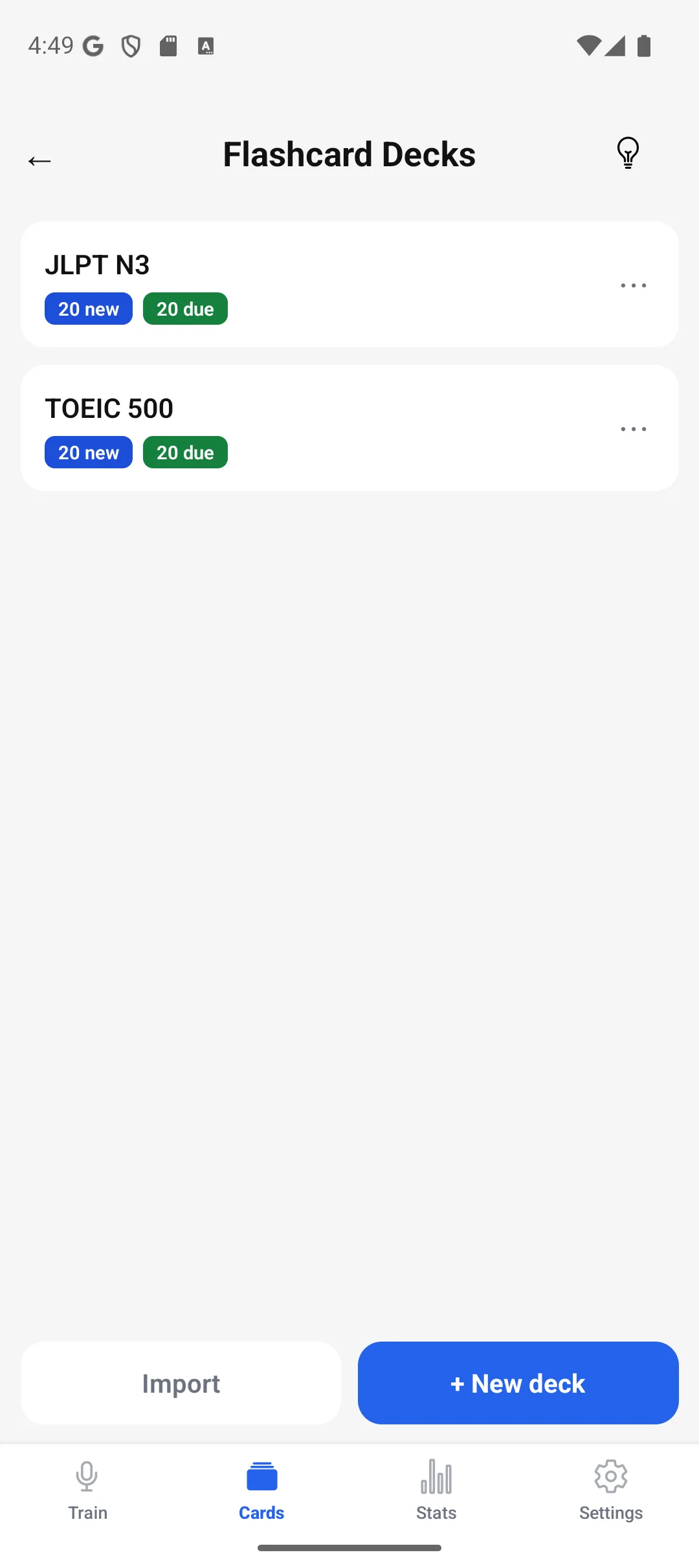
Flashcard deck manager with SRS badges
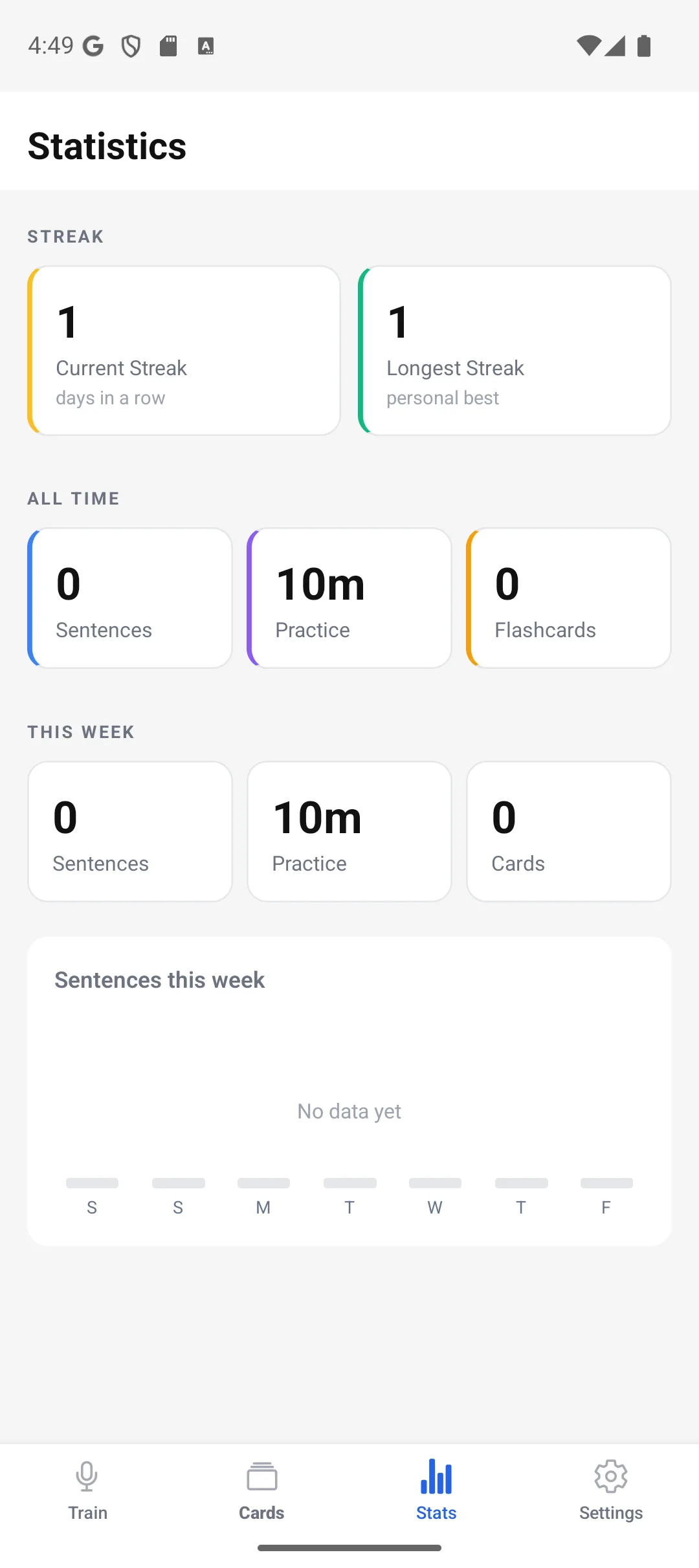
Statistics screen with streak and weekly chart
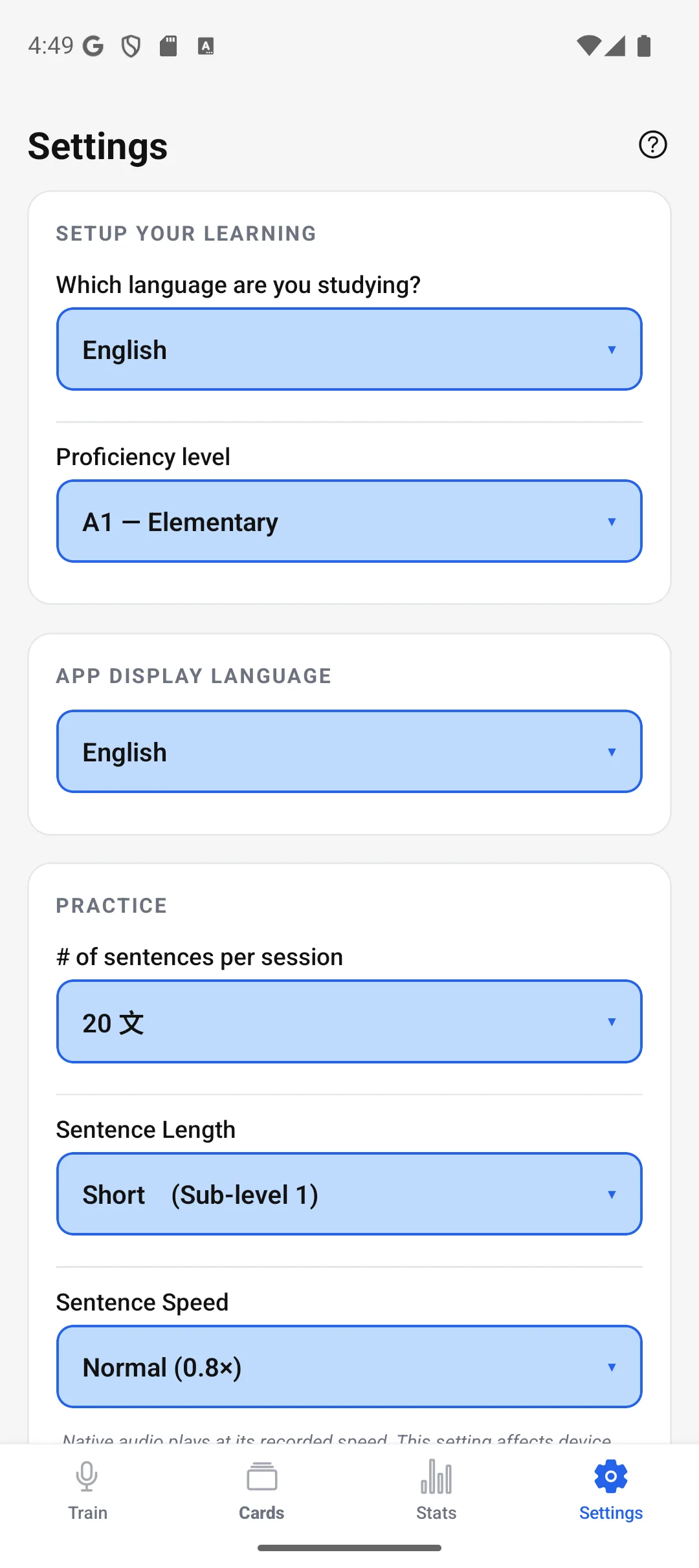
Settings screen with CEFR level selector

Dashboard: daily goal & activity chart

0
CEFR Levels
0
Learning Modes
0
SRS Engines
0
Play Store Reviews

Four tools built around speaking practice.

Speaking is the main loop. The other tools give you vocabulary, grammar, and review work to support it.

Echo Fluency
pronunciation trainer

Listen to a native sentence, repeat it, hear yourself, and get an evaluation. The microphone opens automatically, and missed sentences can return for another attempt.

Cloud TTS STT Evaluation Custom SRS

SM-2 flashcard
vocabulary

Flashcards use an SM-2-based review schedule. Rate each card Again, Hard, Medium, or Easy, and the next interval changes with your rating.

SM-2 Word Details Cloud Sync

CEFR grammar
guide A1–B2

Grammar patterns are organized from A1 through B2. Examples include native audio, and interactive quizzes let you check each pattern.

4 CEFR Levels Native Audio SRS Tracking

Vocabulary games
& challenges

Speed Tap, matching, and Fever Pitch use vocabulary from your decks, giving you another way to review the same words.

Your Decks Speed Tap

How Echo Fluency works

Echo Fluency is the app's speaking practice loop. You listen to a native sentence, repeat it, hear your recording, and receive speech-to-text evaluation. The microphone and playback steps are handled for you.

▶ Try the loop · A2 sentence card 03 / A2-1

I would like to order a coffee, please.

/aɪ wʊd laɪk tuː ˈɔːrdər ə ˈkɒfi pliːz/

Used when: ordering at a café or counter.

Tap mic · listen, then repeat Auto-record starts after the prompt plays.
1

Native sentence plays

A CEFR-graded sentence appears. High-quality cloud TTS plays the native audio. You listen.

2

Auto-record starts

The microphone opens automatically after playback. Just repeat. No tapping.

3

Your voice plays back

You hear yourself immediately. The gap between you and the native model becomes obvious, and that's where the improvement happens.

4

Instant evaluation

Speech-to-text grades your pronunciation. ✅ Correct → next sentence. ❌ Incorrect → re-queued until you nail it.

5

SRS schedules your return

Master a sentence five times and the review interval multiplies by 4×, advancing it to the next mastery tier. Review time is focused on sentences that still need practice.

Three recording modes
Echo Fluency (Auto): full hands-free cycle. Recommended.
Timed: TTS plays, then a fixed recording window opens.
Hold to Record: push-to-talk. Full manual control.
Content structured by CEFR level
B2
Upper-Intermediate

Independent use · detailed discussion & argument

B1
Intermediate

Everyday conversation & routine matters

A2
Elementary

Simple exchanges on familiar topics

A1
Beginner

Foundational vocabulary & basic phrases

Four CEFR levels total, from absolute beginner to confident, independent use. Your Roadmap tracks real progress across all of them.

Review vocabulary on an SM-2-based schedule.

Flashcards use an SM-2-based spaced-repetition schedule. Your Again, Hard, Medium, or Easy rating changes the next review interval.

How SM-2 works

Rate → schedule → review at the next interval

Again

Resets to Learning. Short interval. Ease drops.

Hard

Interval shrinks. Stays in Learning. Ease drops.

Medium

Standard SM-2. Interval × ease factor.

Easy

Interval extends further. Ease rises. Heads weekly.

💡 After 5+ correct reviews a card enters mature territory: multi-week intervals, no time wasted on what you already own.

Everything in the deck system

  • ✓CEFR preset decks: A1–B2 vocabulary imported on first launch.
  • ✓Custom decks: word, definition, example.
  • ✓Word details: full definition and part of speech on long-press.
  • ✓SRS status badges: New, Due Now, Later-Today counts at a glance.
  • ✓Cloud backup: Firebase sync across devices.

Open the app. See what needs practice.

The Dashboard shows your daily target, cards due for review, activity history, and position across the CEFR roadmap.

📅

Daily goal tracker

Sentences completed vs. your daily target. See sentences completed against your daily target and the number of cards due for review.

📈

Activity chart

Bar chart of daily completions over the past 7 or 30 days, with your goal line. See recent practice activity against your goal.

🗺️

CEFR roadmap

Horizontal bar chart of remaining new sentences across all CEFR levels. Your current position highlighted.

🔔

Study reminders

Configurable daily notifications keep your streak alive. Choose when you want the app to remind you to practice.

⚙️

Configurable settings

CEFR level, sentence length, TTS voice, sentence speed, recording mode, dark mode, all adjustable per session.

☁️

Cloud data sync

Firebase-backed backup for decks and SRS progress. Your decks and SRS progress can be backed up and restored across devices. Anonymous authentication is supported.

FluencyTool is a fit if you…

🌱

You have basic English already

Set your level to A1 or A2. The beginner course covers foundational vocab and everyday phrases.

🎓

You're preparing for a CEFR-based exam or interview

All content is organised by CEFR level. Drill the patterns and vocabulary that actually come up in speaking assessments.

🗣️

You can read but can't speak

Echo Fluency was built for exactly this. You know many of the words already, but need more practice saying them.

💼

You need English for work or study

Use short speaking sessions to practice everyday and workplace English.

✈️

You're travelling somewhere English is spoken

A1 content includes practical phrases for common travel situations.

🏔️

You're pushing toward B2

Use higher-level sentences and grammar as you move toward B2. The Roadmap shows which levels still have new content.

Make speaking practice part of your daily study.

Use Echo Fluency for speaking practice, then review vocabulary and grammar in the same app. The core app is free, with an optional one-time purchase to remove ads.

⬇Download the Free App

Free core · Optional one-time purchase to remove ads · No subscription

See the app before you download it.

These are current FluencyTool screens: the dashboard, speaking session, flashcards, statistics, and settings.

FluencyTool dashboard with activity chart and daily goal
Echo Fluency live recording session
Flashcard deck manager with SRS status badges
Statistics screen with streak and weekly chart
Settings screen with CEFR level selector

Current Google Play rating

4.8
320+ Google Play reviews

The 4.8 rating and 320+ reviews are for FluencyTool on Google Play overall, not for the English track alone.

Frequently asked questions

Direct answers about the app, levels, review systems, and platform support.

Is FluencyTool completely free?
Yes. Echo Fluency, all flashcard features, the full CEFR A1–B2 grammar guide, and vocabulary games are completely free. There's an optional one-time purchase to remove banner ads.
What CEFR levels does FluencyTool cover?
All four CEFR levels: A1 (absolute beginner) through B2 (confident, independent use). The Dashboard Roadmap shows your progress across all of them.
What is Echo Fluency and how does it work?
The app's core speaking mode. A native sentence plays via cloud TTS, your mic opens automatically, your voice plays back, then speech-to-text compares your pronunciation. Correct sentences get scheduled for later. Missed ones re-queue. Hands-free.
How does the spaced repetition work?
Two SRS systems run in parallel. Flashcards use SM-2 (Anki's algorithm) with Again / Hard / Medium / Easy ratings that adjust intervals. Speaking sentences use a custom algorithm where mastering 5× triggers a 4× interval bonus.
Do I need prior English knowledge to start?
You should have some basic English already (roughly A1 level). Set your level to A1 and the app starts with foundational vocabulary and everyday phrases. The onboarding wizard walks through every preference.
Does the app work offline?
Flashcard study and vocabulary games work fully offline. Echo Fluency requires an internet connection for cloud TTS audio playback and speech-to-text evaluation.
Is there an iPhone version?
Yes! FluencyTool is available now on the App Store for iPhone, alongside the Android app. You can also use the browser version, which works on any device.
Can I switch to the Japanese track instead?
Yes, they're the same app. FluencyTool's Japanese track covers JLPT N5 through N1 with the same Echo Fluency shadowing loop, plus kanji breakdowns and furigana support.

Also studying Japanese?

The same FluencyTool app also includes a Japanese track, graded from JLPT N5 through N1.

🇯🇵
FluencyTool · Japanese Track
Same app, same shadowing loop, JLPT N5–N1 grammar guide, kanji breakdowns, and furigana support.
Visit the Japanese track →

Practice speaking English every day.

Start with an Echo Fluency session, then use flashcards and grammar review to reinforce what you are learning.

⬇Download the Free App
✓ All core features free ✓ No subscription ✓ Android 7.0+ & iOS

Share with someone learning English

X f
FluencyTool
★★★★★ 4.8 · Free · Android
Install