My SenpaiYoMoo — Japanese Reading App
YoMoo

Read Real
Japanese.
Actually Understand It.

YoMoo turns authentic Japanese news, literature, and JLPT passages into an interactive reading experience — with instant furigana, one-tap word lookups, and a vocabulary system that actually sticks.
6
Content Sources
N5–N1
All JLPT Levels
170k+
Dictionary Entries
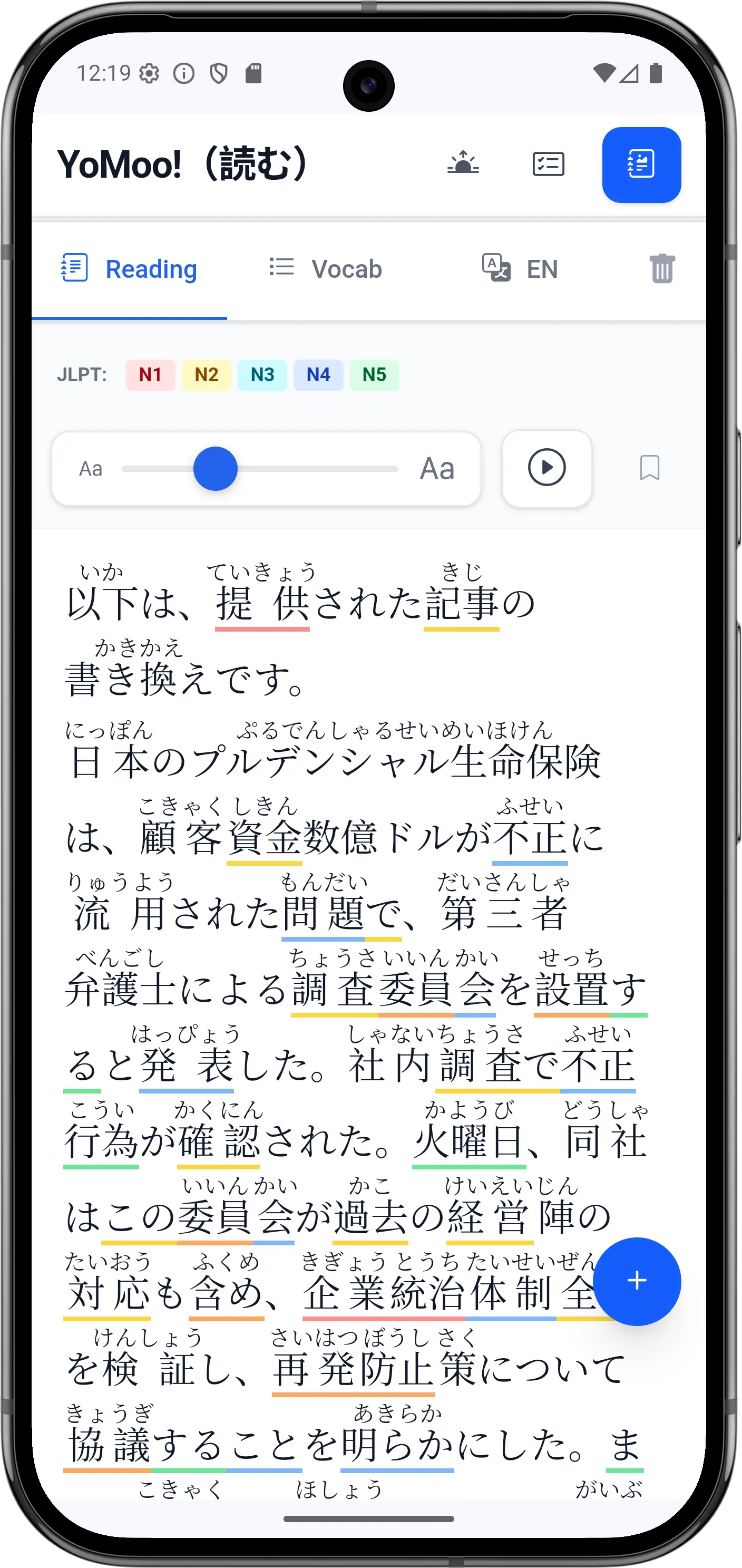
Reading View
Reading view with furigana annotations
Instant Furigana
Every kanji, auto-annotated
Real Japanese Content
News, literature, JLPT practice
SRS Vocabulary
Words that stick long-term
Scan Anything
OCR any Japanese text
Core Features

Built for how real Japanese reading works

Not a gamified lesson app. A genuine reading tool — the kind you'll reach for daily, long after you've outgrown beginner apps.

Smart Furigana

Kuromoji tokenization delivers accurate furigana with correction rules for irregular readings — dates, counters, compound words. Toggle always-on, unknown-words-only, or off as your skills grow.

One-Tap Dictionary

Tap any word for its full JMdict entry: readings, all definitions, part of speech, JLPT level, and verb conjugation grammar notes — without ever leaving the article.

Spaced Repetition (SRS)

Words saved from articles are reviewed at scientifically optimal intervals — 4h → 8h → 24h → 3 days → 1 week → 1 month. Quiz mode (multiple choice) and 3D flashcard mode keep review engaging.

Native Text-to-Speech

Android's Japanese TTS reads entire articles at a learner-friendly 80% speed. Tap any word in the dictionary popup to hear it pronounced in isolation.

Multi-Level Reading

Every article comes with a simplified version at your JLPT target level — letting beginners and advanced readers engage with the same content at different depths. Pre-simplified versions load instantly, so you can step down the difficulty of any article in a single tap.

Camera OCR & File Import

Point your camera at any Japanese text — menus, manga, signs, packaging — and YoMoo analyzes it instantly. Also supports PDF, DOCX, PPTX, and SRT subtitle files.

English Translation

One tap reveals the full English translation of any article. Pre-translated content loads instantly; user content is translated via AI and cached locally for 30 days.

Anki & CSV Export

Export vocabulary directly to AnkiDroid or as UTF-8 CSV — word, reading, definitions, part of speech. Select words individually or batch-export across multiple articles.

Progress Tracking

Track reading time (with idle detection so it only counts active reading), articles completed, words looked up, unique vocabulary seen, and your login streak.

Content Library

From JLPT prep to native literature — all in one app.

Six carefully chosen sources cover every ability level. Every article is pre-processed with curated vocabulary lists, English translations, and simplified versions — so you spend your time reading, not hunting for content.

Every article includes
Curated vocabulary list with JLPT levels
Pre-cached English translation
Simplified version at your JLPT level
Word count & difficulty rating
Completion tracking & bookmarks

JLPT Practice Passages

N5N4N3N2N1

Official-style reading comprehension passages for all five JLPT levels. Bundled locally — works fully offline. Ideal for exam prep and structured study.

Current News & Events

N3–N1

Real Japanese news covering politics, business, science, culture, and international affairs. AI-rewritten for improved reading flow, with pre-processed vocabulary and translations. Updated regularly.

How-To Articles

N3–N2

Practical Japanese guides on daily life, health, technology, nature, and emergency preparedness. Bilingual — Japanese content with English reference alongside.

Aozora Bunko

N3–N1

Japan's public-domain classic literature — Soseki, Akutagawa, Dazai, and hundreds more. Fiction, poetry, essays, folklore, and drama. Culture and language in their most authentic form.

Japanese Wikipedia

N2–N1

Live access to Japanese Wikipedia across 9 subject categories — science, history, culture, technology, geography, politics, economy, sports, and society.

Your Own Content

Any level

Camera OCR, PDF/DOCX/PPTX upload, SRT subtitle files, or paste any text. Analyze manga, menus, work documents, or anime subtitles — anything in Japanese.

App Screens

Every screen designed for your reading flow

Furigana Reading Mode

Furigana Reading Mode

Annotated reading with JLPT color-coding and TTS controls
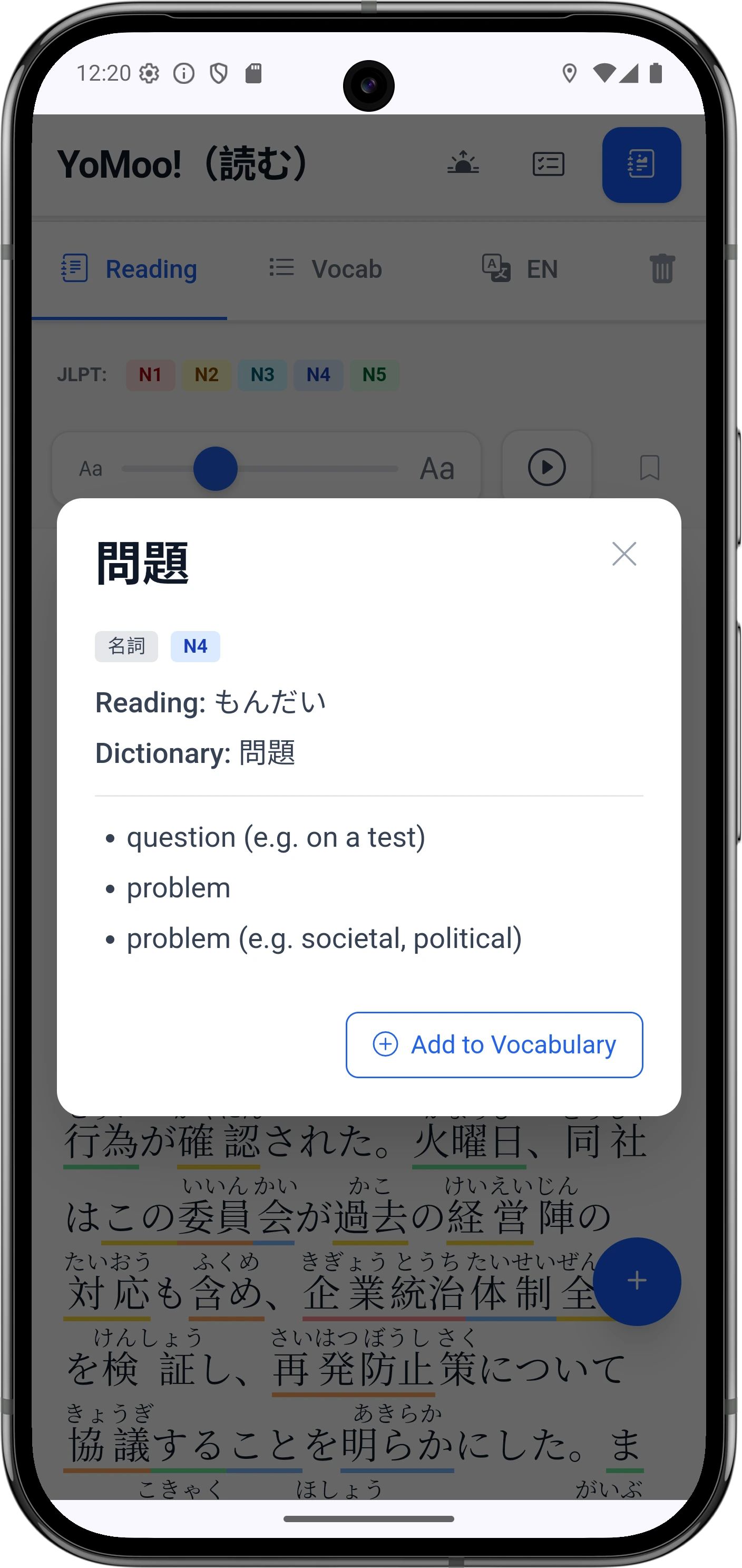
One-Tap Dictionary

One-Tap Dictionary

Full JMdict entry with grammar notes — never leave the article
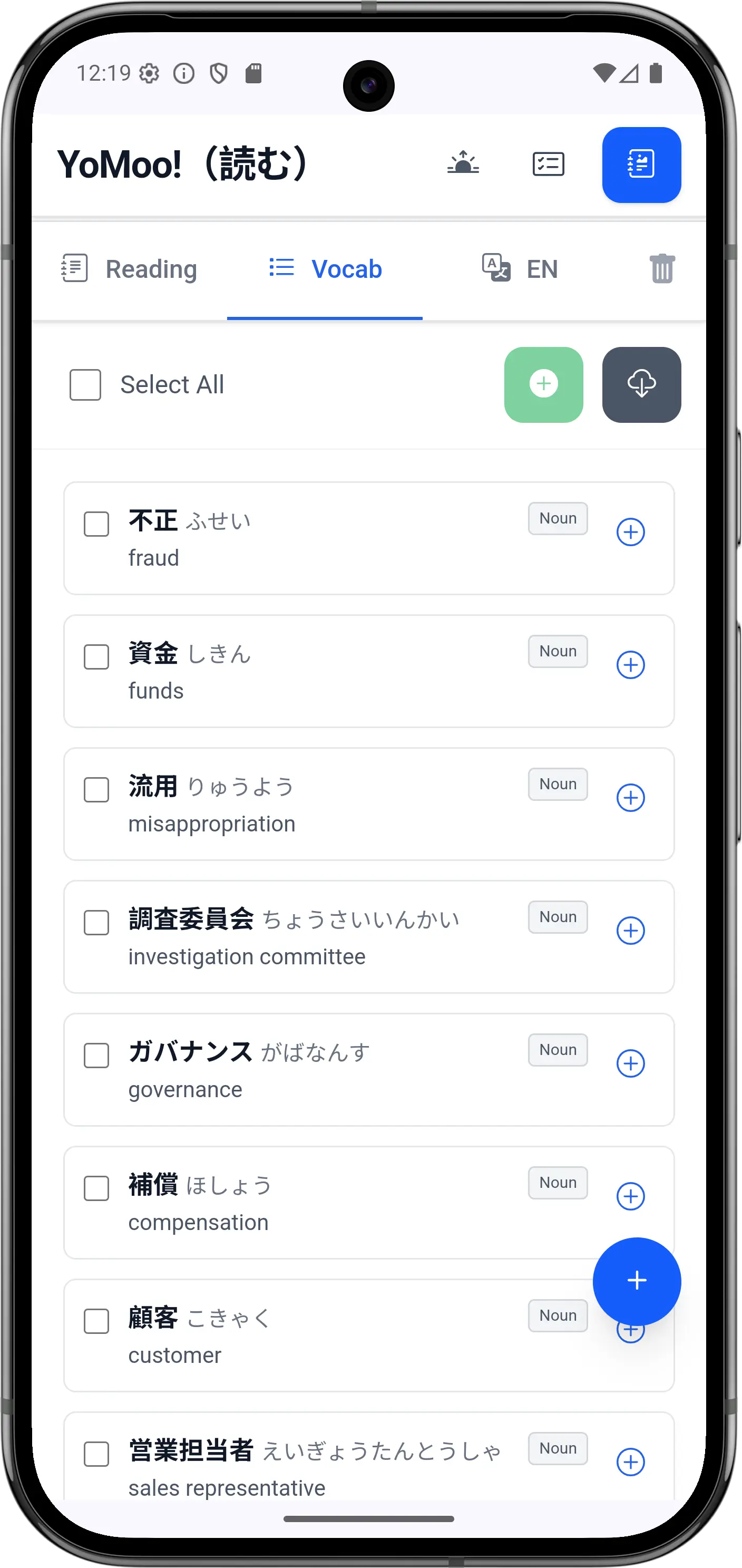
Article Vocabulary Panel

Article Vocabulary Panel

All key words extracted — save or export in bulk
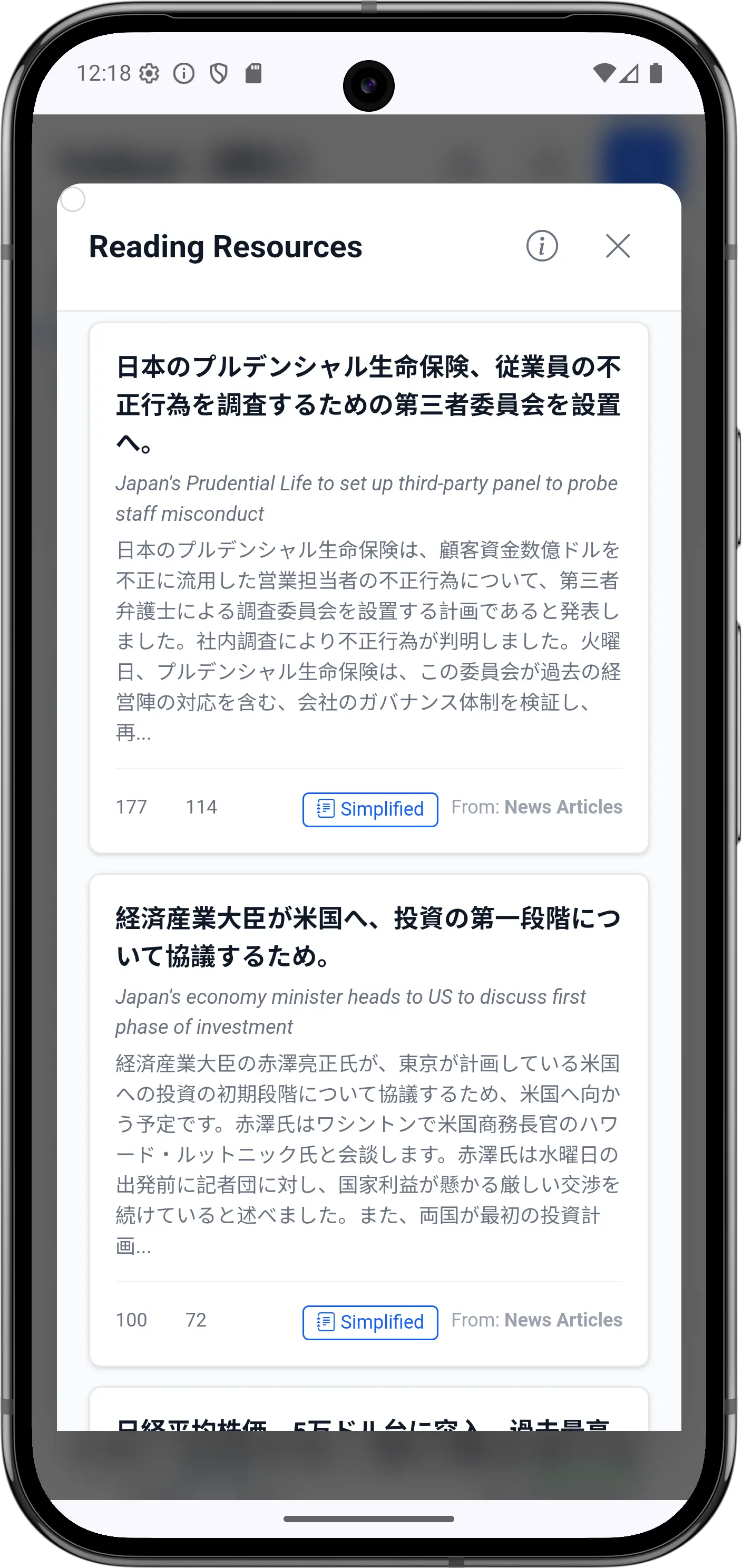
Content Library

Content Library

Browse by source, category, and difficulty
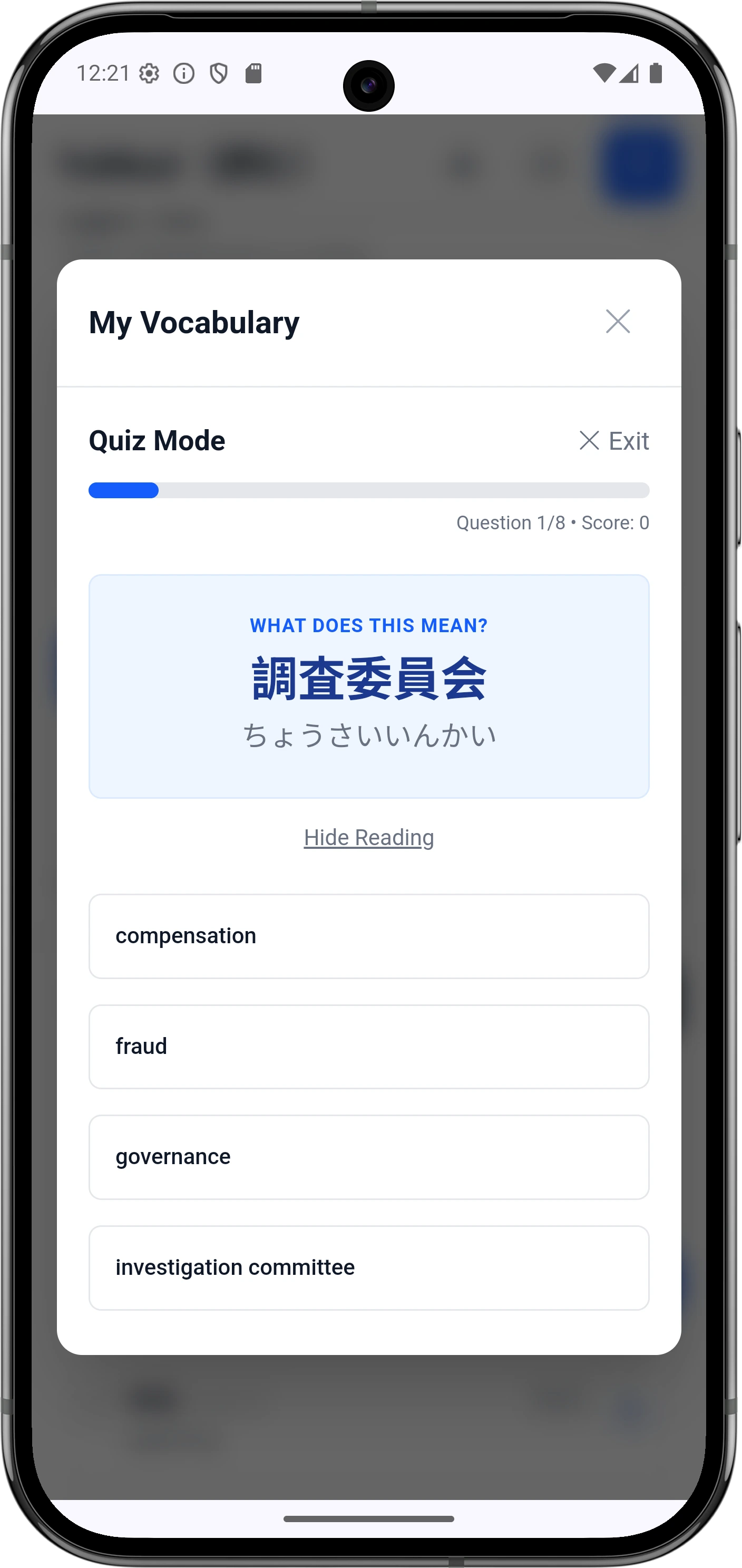
SRS Vocabulary Quiz

SRS Vocabulary Quiz

Spaced-repetition quizzing for maximum retention
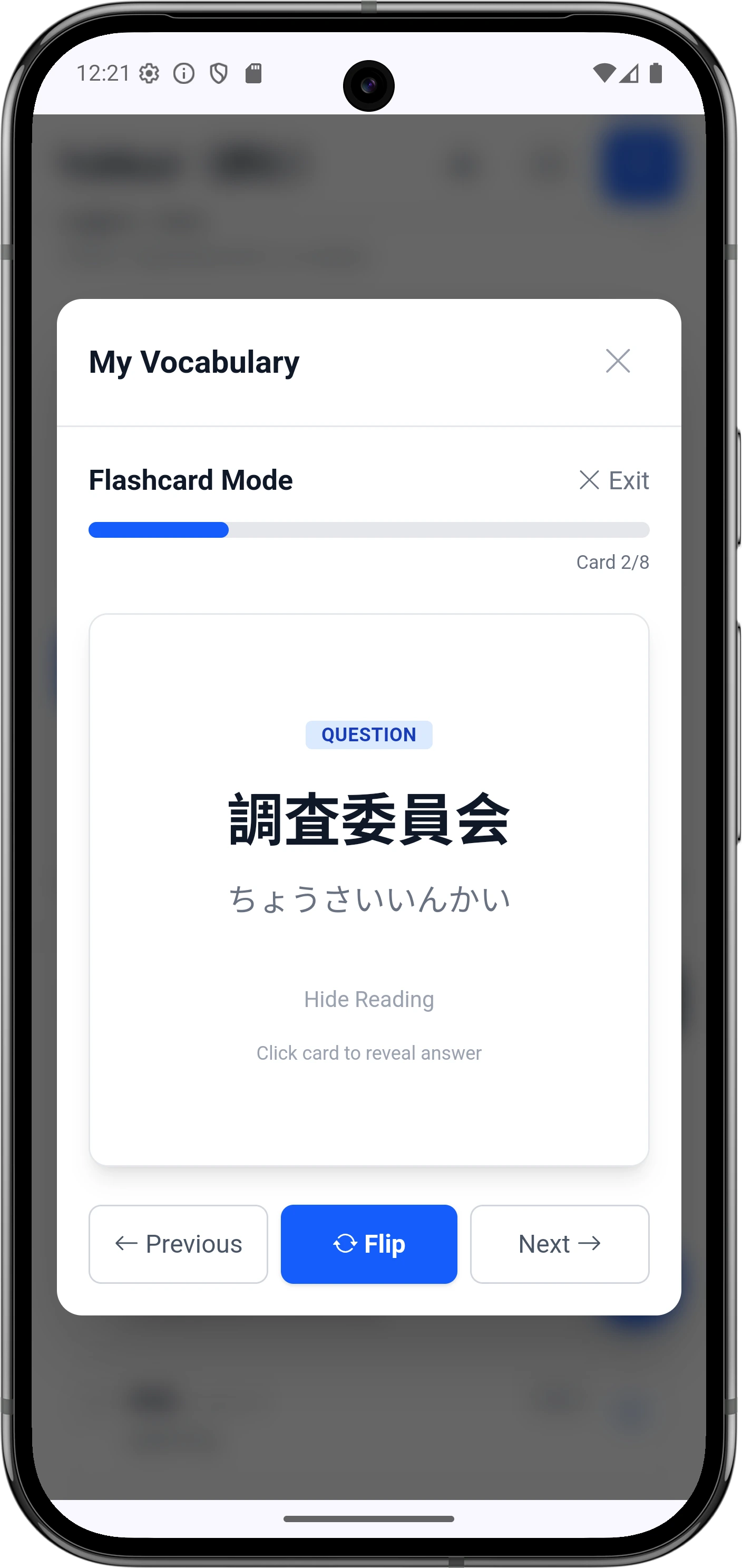
3D Flashcard Mode

3D Flashcard Mode

Self-rated Easy/Hard SRS advancement

JLPT Level Guide

Wherever you are, YoMoo has content for you.

Set your JLPT level in settings — YoMoo uses it to tailor simplification targets, difficulty indicators, and recommended content. The right challenge level, every session.

LevelVocabularyBest Content in YoMoo
N5~800 wordsJLPT N5 Passages, Sample Texts
N4~1,500 wordsN4 Passages, Simplified News, How-To
N3~3,750 wordsN3 Passages, Current News, How-To (all)
N2~6,000 wordsCurrent News, Aozora Bunko (beginner works)
N110,000+ wordsAll sources, full Aozora Bunko, Wikipedia
Why YoMoo

The Japanese reading app that goes further

YoMoo gives you everything you need to read authentic Japanese — all in one app, with no account or subscription required.

FeatureYoMooOther Reading Apps
Instant furigana on all textvaries
One-tap dictionary from reading view
Built-in SRS vocab — quiz & flashcards
Curated JLPT passages (N5–N1)
Classic Japanese literature (Aozora Bunko)
AI article simplification to your JLPT level
Camera OCR — analyze any Japanese textrarely
Direct Anki / CSV export
No account or subscription requiredoften required
Offline vocabulary & progress (local storage)varies
★ 5-Star Reviews · Google Play

What learners are saying

"
★★★★★

Great app for reading and learning japanese

Play Store User
Verified Review · Google Play
"
★★★★★

Awesome app for practicing Japanese reading daily

Play Store User
Verified Review · Google Play
"
★★★★★

By far Your Daily Dose of Japanese Reading Practice. on the Play Store. I can actually read Japanese when using YoMoo!

Play Store User
Verified Review · Google Play
How It Works

From article to learned vocabulary in four steps

1. Choose an Article

Browse by source and JLPT level, or paste your own text. Filter by category, difficulty, or completion status.

2. Read with Support

Furigana on every kanji. Tap any word for its definition. Listen via TTS. Simplify or translate with one tap.

3. Save Vocabulary

Add words individually or in bulk. Each is saved with reading, definitions, JLPT level, and part of speech.

4. Review & Retain

SRS schedules reviews at exactly the right moment. Quiz and flashcard modes reinforce active recall. Export to Anki anytime.

FAQ

Frequently Asked Questions

Everything you need to know about YoMoo before you download.

Is YoMoo really free? What's the catch?
Yes — genuinely free with no account required and no core features locked behind a paywall. All JLPT practice passages, furigana, one-tap dictionary, SRS vocabulary, and reading tools are included at no cost. There is no subscription. Some on-demand translation of user-imported content uses a network call. Ad-free users can access all features offline as well.
What JLPT level do I need to start using YoMoo?
YoMoo works from beginner (N5) up to advanced native-level (N1 and beyond). Users should be able to read hiragana and katakana before using the app. The JLPT Practice Passages section includes reading comprehension texts for all five levels. If a news article feels too difficult, the simplified version lets you read the same content at a lower JLPT level — so you're never stuck without something readable. Furigana can be set to always-on for beginners, or restricted to unknown words as your skills grow.
How is YoMoo different from NHK Web Easy or Todai?
NHK Web Easy and Todai are primarily news-reading tools. YoMoo goes further: it covers six content sources (news, JLPT passages, Aozora Bunko literature, how-to articles, Wikipedia, and your own imported content), includes a full spaced-repetition vocabulary system, lets you export directly to Anki, and adds camera OCR so you can analyze Japanese text from the real world. Every article also comes with a pre-processed vocabulary list, English translation, and simplified version — features most reading apps lack.
Does YoMoo work offline?
Partially. All 170,000+ dictionary entries, your saved vocabulary, SRS review queue, and the complete JLPT practice passage library are stored locally and work without a connection. Live news, Wikipedia, and on-demand translations require internet access. Once an article's translation or simplified version has been loaded, it is cached locally for 30 days.
Can I import my own Japanese content?
Yes. YoMoo supports pasting raw text, uploading PDF, DOCX, and PPTX files, importing SRT subtitle files (great for anime), and using the camera OCR to capture any Japanese text in the real world — menus, books, packaging, signs. Once imported, the content is treated the same as any built-in article: you get furigana, one-tap lookups, TTS, and vocabulary saving.
How does the simplified content work?
Each built-in article has a simplified version pre-prepared and stored server-side, rewritten to a lower JLPT level with simpler vocabulary and grammar structures. This means it loads instantly — no waiting. The idea is that a group of learners at different levels can all read the same article: beginners use the simplified version, advanced learners tackle the original. It's a powerful approach for keeping reading material relevant and motivating regardless of your current level.
Is YoMoo available on iOS (iPhone)?
YoMoo is currently Android-only, available free on the Google Play Store. An iOS version is not yet available. In the meantime, a web version is accessible at my-senpai.com/analyzer/yomoo/ which offers core reading functionality from any browser.
How does the SRS vocabulary system compare to Anki?
YoMoo's built-in SRS uses intervals of 4h → 8h → 24h → 3 days → 1 week → 1 month, with quiz mode (multiple choice) and 3D flashcard mode. It's designed for zero-friction word saving while reading — you tap a word, tap save, and it enters the review queue automatically. If you prefer Anki's mature ecosystem, you can export your vocabulary directly to AnkiDroid or as a UTF-8 CSV at any time. Many users use both: YoMoo for daily reading-integrated review, Anki for long-term deck management.

Start reading real Japanese today.

No account. No subscription. No paywall on core features.
Download free and start reading in minutes.